

Use webhooks
A webhook sends a submission's data to a web address you choose, as soon as that submission finishes. It is how you connect an upload form to Make, n8n, or an endpoint you have built yourself. Webhooks are available on the Business and Premium plans, and during a Business trial.
A webhook belongs to one form. Each form has its own field, and there is no account-wide webhook.
Every request is signed, and a request that does not get through is retried on a schedule that runs about 31 hours.
Set a webhook address
- On the Upload Forms page, open your form.
- In the Build tab, open Integrations.
- Enter your endpoint's address in Webhook URL.
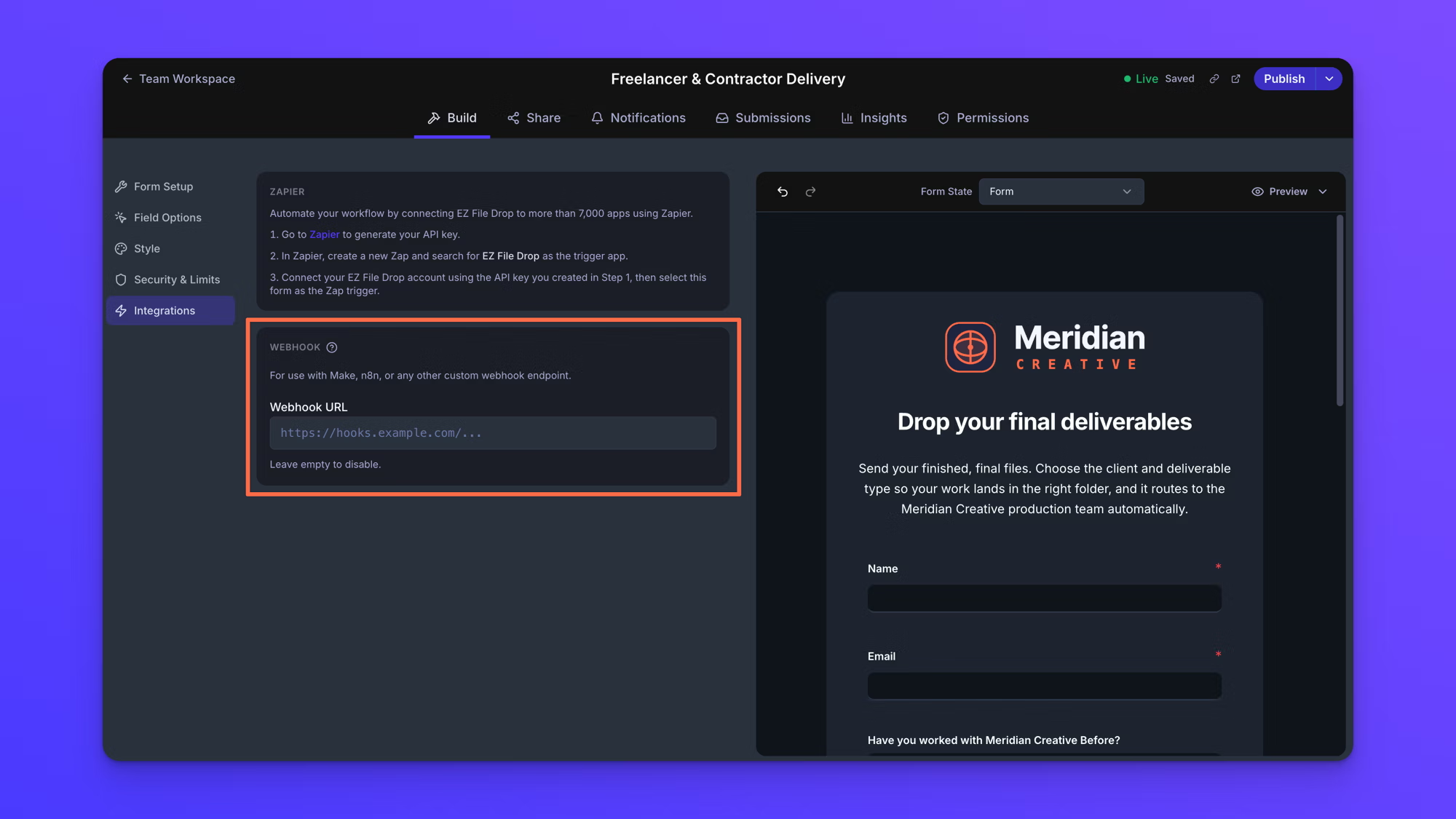
The address is checked when you save it. An address that is not acceptable is rejected with an error on the field, and the message ends "This webhook won't be saved until it's fixed."
An address has to meet all of these:
- It starts with
https://. A plainhttp://address is rejected. - It carries no username or password inside the address itself.
- It points at a public host. Localhost and loopback addresses, private and reserved IP addresses, cloud metadata hosts, and hostnames ending in
.local,.internal,.lan,.intranet, or.home.arpaare all rejected. - It is 2048 characters or fewer.
That check reads the shape of the address, not whether anything is listening at it. A well-formed address pointing at nothing saves cleanly and then delivers nothing, so send a test submission through the form and confirm your endpoint received it. There is no test button in EZ File Drop; a real submission through the form is how you test a webhook.
Unlike most form settings, a webhook address is used as soon as it saves. You do not need to click Publish changes for a new address to start working.
When the webhook fires
The webhook fires once per submission, after that submission reaches its final state. That is after every file has been delivered to your upload destination, or after the delivery has failed for good. It does not fire the moment someone clicks submit, and it does not fire once per file.
Expect a gap between the upload and the request. Files have to finish transferring to your upload destination first, and on a large submission that can be several minutes after the person saw the success screen.
Failed submissions are sent as well as successful ones, which is what makes a webhook a reasonable way to keep an eye on a form you depend on. The event key and the X-EZFD-Event-Type header both read submission.completed on a submission that succeeded and submission.failed on one that failed for good. The status key reads completed or failed alongside them, so you can route on either one.
A submission that failed carries the same set of keys as one that succeeded. If the upload failed outright, file_count reads 0 and files is empty.
A Draft form receives no submissions, so its webhook never fires. See Form statuses.
Every form's webhook receives both event types. There is no setting for subscribing to one and not the other.
Request headers
Every delivery carries the same set of headers.
Content-Type, alwaysapplication/json.User-Agent, readingEZFileDrop-Webhooks/1.0 (+https://ezfiledrop.com/docs/webhooks).X-EZFD-Api-Version, the version of the payload format, currently2026-09-01.X-EZFD-Event-Type, eithersubmission.completedorsubmission.failed.X-EZFD-Event-Id, an identifier beginningevt_that stays the same across every retry of the same event. Record it and use it to ignore an event you have already processed.X-EZFD-Delivery-Id, a unique identifier for that one delivery attempt.X-EZFD-Attempt, the attempt number, from 1 to 7.X-EZFD-Timestamp, the moment the request was signed, in unix seconds.X-EZFD-Signature, carrying that same timestamp and an HMAC-SHA256 signature of the request body.
POST /webhook-listener HTTP/1.1
Content-Type: application/json
User-Agent: EZFileDrop-Webhooks/1.0 (+https://ezfiledrop.com/docs/webhooks)
X-EZFD-Api-Version: 2026-09-01
X-EZFD-Event-Type: submission.completed
X-EZFD-Event-Id: evt_a1b2c3d4e5f6a7b8
X-EZFD-Delivery-Id: 9f3c2e18-4b7a-4c05-9d61-3e8a5f0c72b4
X-EZFD-Attempt: 1
X-EZFD-Timestamp: 1755807600
X-EZFD-Signature: t=1755807600,v1=c8f2e4d9...
The payload
Read form responses from field_values. field_data is the older shape and exists only so that integrations built before field keys keep working.
The body of every request is JSON. Every key sits at the top level, and nothing is wrapped inside a container object, so a no-code tool can reach any of them without digging through nested paths.
These keys came first and are unchanged, in the same positions, so an integration built before signing and file details were added keeps working without a change:
event, readingsubmission.completedorsubmission.failed.form_id, the form's ID, andform_name, the form's name at the time the request is sent.submission_id, the submission's own ID.field_data, the older responses object, kept so that integrations built before field keys existed keep working.file_count, the number of files in the submission.total_size_bytes, the combined size of those files in bytes.submitted_at, the moment the person submitted the form, as an ISO 8601 timestamp.status, reading eithercompletedorfailed.
These keys were added alongside them:
event_id, the same identifier as theX-EZFD-Event-Idheader, and the key to de-duplicate on. It is carried on webhooks only, and is not part of what the Zapier trigger sends.api_version, the version of the payload format, currently2026-09-01.created_at, the moment the payload was built.submission_url, a link that opens that submission in EZ File Drop.field_values, the responses given on the form, keyed by field key. This is the one to read.fields, the same responses as an ordered array, one entry per field, each holdingid,key,label,type,position, andvalue.files, one entry per uploaded file.
{ "event": "submission.completed", "form_id": "frm_abc123", "form_name": "Wedding Photo Upload", "submission_id": "sub_xyz789", "field_data": { "fld_001": "Sarah Jones", "fld_002": "sarah@example.com", "fld_003": "Reception candids" }, "file_count": 1, "total_size_bytes": 2485760, "submitted_at": "2026-08-21T18:45:32.123456+00:00", "status": "completed", "event_id": "evt_a1b2c3d4e5f6a7b8", "api_version": "2026-09-01", "created_at": "2026-08-21T18:45:33.456Z", "submission_url": "https://next.ezfiledrop.com/forms/frm_abc123/submissions?submission=sub_xyz789", "field_values": { "full_name": "Sarah Jones", "email": "sarah@example.com", "notes": "Reception candids", "photos": ["file_7a8b9c0d1e2f"] }, "fields": [ { "id": "fld_001", "key": "full_name", "label": "Full Name", "type": "text", "position": 1, "value": "Sarah Jones" }, { "id": "fld_002", "key": "email", "label": "Email Address", "type": "email", "position": 2, "value": "sarah@example.com" }, { "id": "fld_003", "key": "notes", "label": "Additional Notes", "type": "textarea", "position": 3, "value": "Reception candids" }, { "id": "fld_004", "key": "photos", "label": "Photo Upload", "type": "file_upload", "position": 4, "value": ["file_7a8b9c0d1e2f"] } ], "files": [ { "id": "file_7a8b9c0d1e2f", "field_id": "fld_004", "field_key": "photos", "name": "reception_candids.jpg", "size_bytes": 2485760, "content_type": "image/jpeg", "download_url": "https://next.ezfiledrop.com/api/public/f/dl_xxxxxxxxxxxx", "download_url_expires_at": "2026-08-28T18:45:33.000Z", "destination_url": "https://drive.google.com/file/d/1ABC123..." } ]}How form responses are keyed
Read form responses from field_values. It is an object keyed by each field's field key, which is a readable slug such as email or full_name. A field's key is set in the form builder and can be changed there, so change one only deliberately once something is mapped to it.
fields carries the same answers as an ordered array, with each field's label, type, and position alongside its value. Use it when you need the form's structure rather than a single lookup.
Both field_values and fields include every field on the form. A field left blank comes through as null rather than being left out, which is how your endpoint tells a blank answer apart from a field that is not on the form at all. A form carrying a notes field that the person skipped sends this:
"field_values": {
  "notes": null
}
A form with no notes field on it sends no notes key at all. So a null means the question was asked and skipped, and a missing key means the question is not on that form.
Values are typed rather than sent as strings:
- Numbers and ratings come through as JSON numbers where converting them loses nothing.
"42"becomes42, while"01234"and"1.50"stay strings, because converting either one would change it. - Dates come through as
YYYY-MM-DD. - A checkbox field that allows several options comes through as an array of the values chosen.
- A single checkbox or an authorization field comes through as
trueorfalse. Unticked isfalse, not missing. - A Name field comes through as an object holding
first,last, andfull. - A signature field comes through as an object holding
signed,signer_name,signer_email, andsigned_at. - A File Upload field comes through as an array of the matching
filesentry IDs.
Headings, dividers, text blocks, and page breaks never appear in field_values, fields, or field_data. They collect nothing, so there is nothing to send.
field_data is the older responses object and is kept so that integrations built before field keys existed keep working. It is keyed by each field's internal ID rather than by its key, it leaves out any field the person never touched rather than sending it empty, and it splits a Name field into the field's own ID holding the full name plus the same ID with ::first and ::last added. It carries what the form stored rather than what the payload builder assembles, so a File Upload field never appears in it, and a signature field holds a short name string instead of the object that field_values carries. Build anything new on field_values.
Pre-filling a field through the form's link is a straightforward way to put a value you control into every payload, such as a client ID or a job number. See Pre-fill forms with URL query parameters.
Uploaded files in the payload
The files array carries one entry per uploaded file. Each entry holds id, the field_id and field_key of the upload field the file came from, name, size_bytes, content_type, destination_url, download_url, and download_url_expires_at.
destination_url opens the file where it was delivered, inside your own upload destination, for the providers that give a link back.
download_url is an EZ File Drop link that redirects to the file where it was delivered, in your own upload destination. It is the same place destination_url points, reached through a link EZ File Drop issues, and it never exposes EZ File Drop storage. It only works once the file has arrived: a request made before the file reaches the destination returns 409, and one made after the file has been removed returns 410.
The link works for anyone holding it, so treat it the way you would treat a password. It stops working at the time given in download_url_expires_at, which is 7 days after the link is issued, or sooner where that would run past the 30-day file retention window. A link that still has more than 24 hours left on it is reused rather than reissued. It can be null if no link could be issued.
The signing secret
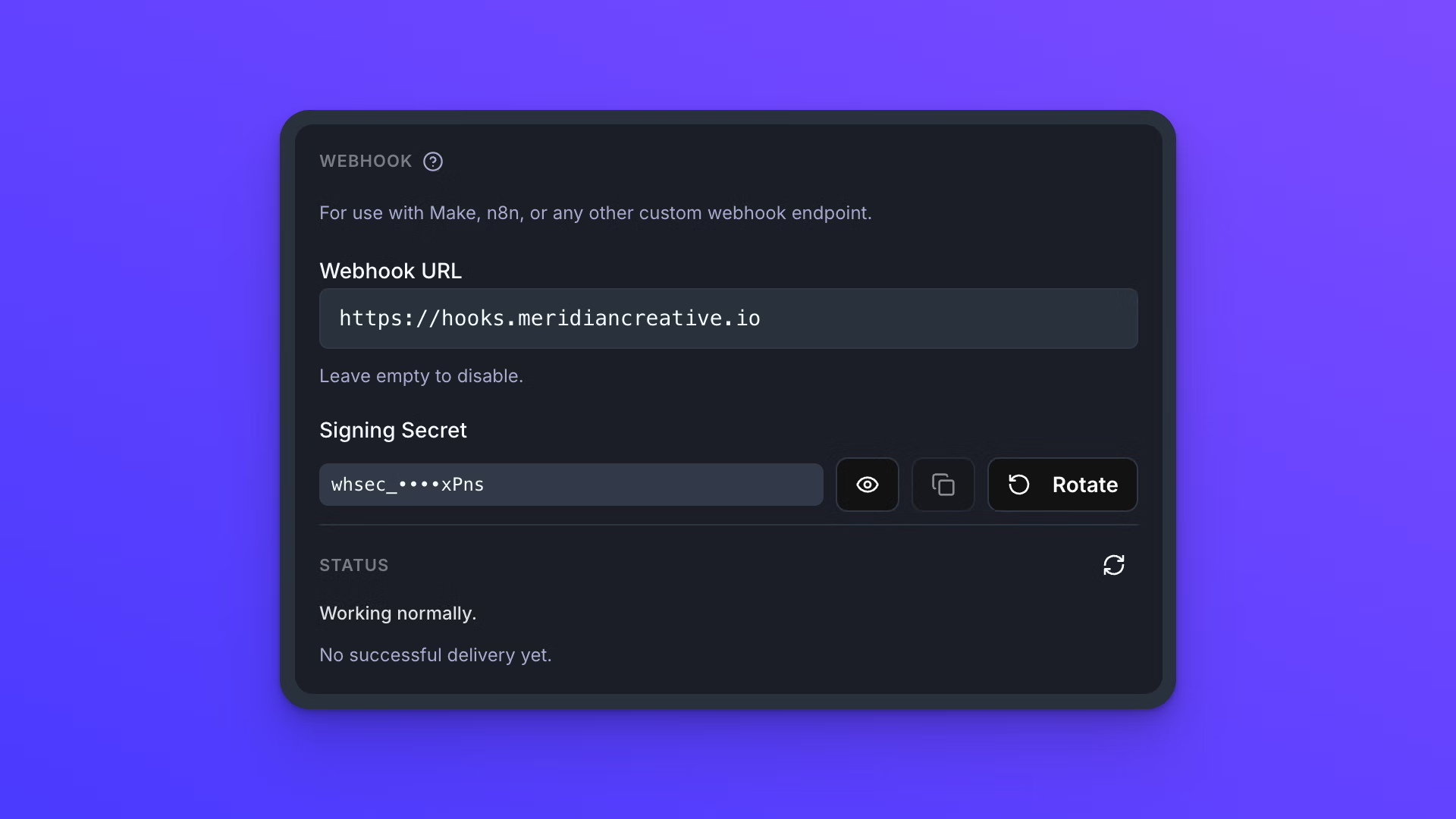
Every form's webhook has its own signing secret, generated automatically the first time a valid address is saved. A secret begins with whsec_.
The secret sits in a Signing Secret block below Webhook URL in the form's Integrations panel, shown masked. Reveal shows it in full, Copy copies it, and Rotate issues a new one.
Rotating keeps the previous secret working for 24 hours. Through that window both signatures are sent on every request, so you can move your endpoint onto the new secret without dropping a delivery.
Verify a request signature
Every request EZ File Drop sends is signed, and verifying that signature is how your endpoint proves a request came from EZ File Drop rather than from someone who guessed your address.
The signature travels in the X-EZFD-Signature header, formatted as t=1755807600,v1=<hex>. t is the unix timestamp the request was signed at, and it matches the X-EZFD-Timestamp header.
Use the raw bytes of the body exactly as they arrived. Parsing the JSON and building it again changes the bytes, and the signature will not match. This is the single most common reason a self-built endpoint rejects valid requests.
In Node:
const crypto = require("crypto");

function verifyEZFD(rawBody, sigHeader, secret) {
  const parts = sigHeader.split(",").map(p => p.split("="));
  const t = parts.find(p => p[0] === "t")[1];
  const sigs = parts.filter(p => p[0] === "v1").map(p => p[1]);
  if (Math.abs(Date.now() / 1000 - Number(t)) > 300) return false;
  const expected = crypto.createHmac("sha256", secret)
    .update(t + "." + rawBody).digest("hex");
  return sigs.some(s => s.length === expected.length &&
    crypto.timingSafeEqual(Buffer.from(expected), Buffer.from(s)));
}
In Python:
import hashlib, hmac, time

def verify_ezfd(raw_body: bytes, sig_header: str, secret: str) -> bool:
    parts = [p.split("=", 1) for p in sig_header.split(",")]
    t = next(v for k, v in parts if k == "t")
    sigs = [v for k, v in parts if k == "v1"]
    if abs(time.time() - int(t)) > 300:
        return False
    expected = hmac.new(secret.encode(),
                        f"{t}.".encode() + raw_body,
                        hashlib.sha256).hexdigest()
    return any(hmac.compare_digest(expected, s) for s in sigs)
In any other language, the same five steps:
- Read
tand everyv1value out of theX-EZFD-Signatureheader. - Build the signed string by joining
t, a full stop, and the raw request body exactly as it arrived, giving{timestamp}.{raw body}. - Compute an HMAC-SHA256 of that string using the form's signing secret, hex encoded in lowercase.
- Compare your result against each
v1value using a constant-time comparison. A match against any one of them is a valid signature. - Reject the request if
tis far from your own clock. Five minutes either side is a common tolerance, and it is what stops an old request being replayed at you later.
For the 24 hours after a rotation, the header carries two signatures, as t=...,v1=<new>,v1=<old>. Accepting a match against any v1 value is what lets a rotation happen without a dropped delivery.
Retries and failed deliveries
A delivery that does not succeed is retried, up to 7 attempts in total. The delays after each failed attempt are 30 seconds, 2 minutes, 10 minutes, 1 hour, 6 hours, and 24 hours, each varied by up to 20 percent so that an endpoint coming back online is not hit by everything at once. The full schedule runs about 31 hours.
These are retried: connection errors, timeouts, and the HTTP responses 408, 429, and anything in the 5xx range. A request that gets no response within 10 seconds counts as a timeout.
These are not retried: any other 4xx response, which is read as your endpoint refusing the request rather than failing to handle it. Redirects are not retried either, and they are never followed. A 3xx response counts as a failure, so the address you save has to be the final address rather than one that redirects.
A 429 response carrying a Retry-After header is respected, up to a maximum of 6 hours. The first three of those do not use up an attempt, and after that they do. A delivery is also given up on once it is still undelivered 48 hours after it was created, however many attempts are left. That age limit only applies to a delivery that has actually been attempted. One that was never attempted, because something on the EZ File Drop side was down, is never abandoned for age.
The form's owner is emailed the first time an event is given up on. The subject reads "Webhook delivery failed for" followed by the form's name.
After 20 events in a row have failed every retry, the webhook is turned off automatically and the owner is emailed again. Saving the address again turns it back on and resets the count.
A webhook that fails changes nothing else. The files are still delivered to your upload destination, the submission is still recorded, and the person who uploaded sees nothing different.
Watch webhook deliveries
The form's Integrations panel shows how the webhook is doing, below Webhook URL and the signing secret.
A status line reads one of three things: "Working normally.", a count such as "3 failed deliveries in the last 24 hours.", or "Turned off automatically after repeated failures. Save the URL again to turn it back on." Below it sits the date of the last successful delivery, or "No successful delivery yet."
Under that is a list of the deliveries that need attention. Successful deliveries are never listed. Each entry says where it stands in plain language, such as "Retrying, attempt 3 of 7, next try in about 2 hours." or "Not delivered after 7 of 7 attempts. Your endpoint did not accept it."
A delivery that has been given up on carries a Send again button. It queues the original payload again, exactly as it was built at the time, with a fresh set of attempts.
A delivery that failed because of a problem inside EZ File Drop rather than at your endpoint is labeled as such, and it does not count toward turning the webhook off.
Each submission's own webhook delivery status also shows in Submissions. See View and manage submissions.
If something is not arriving
Four things account for most webhooks that are not working.
- Nothing arrives at all. The team is on Starter, the form is in Draft, or the webhook has been turned off automatically after 20 events in a row failed every retry. Saving the address again turns it back on.
- The signature never matches. The body was parsed and rebuilt before it was checked, or the secret in use is the old one after a rotation and the 24-hour overlap has passed.
- Every delivery fails, and the endpoint looks healthy. The address returns a 3xx redirect. Redirects are never followed and each one counts as a failure, so save the final address instead.
- A
download_urlreturns 409 or 410. A 409 means the file has not reached your upload destination yet. A 410 means the file has been removed.
How long delivery history is kept
Delivery history is kept for 90 days and then deleted.
The stored copy of the payload and of your endpoint's response is removed after 30 days, so neither is held longer than it is useful. Send again needs that stored payload, so it is not available on a delivery older than 30 days, and the panel explains that in place of the button.
Turn a webhook off
Clear the Webhook URL field. The field's own note reads "Leave empty to disable." An empty field means nothing is sent for that form.
Clearing the field takes effect as soon as it saves, in the same way that setting it does, so you do not need to publish the form to stop the requests.
Behavior notes
- Webhooks are available on the Business and Premium plans, and during a Business trial. Starter is the only plan that does not send them. If your team moves to Starter, the address stays saved on the form and nothing is sent to it. The plan is checked at the moment a delivery would go out, not only in the panel.
- A webhook belongs to one form, and setting one has no effect on any other form.
- One form takes one address. To reach more than one destination, point the webhook at something that can fan out, such as Make or n8n.
- A webhook address is used as soon as it saves, so it does not wait for Publish changes the way the rest of the form does. Turning a webhook back on after it has been turned off automatically works the same way: saving the address is what re-enables it.
- There is no test button. Send a real submission through the form to test a webhook.
- Every form's webhook receives both
submission.completedandsubmission.failed, and there is no setting for choosing one. - Build your endpoint to be idempotent. The same
event_idcan legitimately arrive more than once, because a retry goes out whenever EZ File Drop does not get a clear success back, including when your endpoint handled the request and the response was lost. Record theevent_idand ignore one you have already processed. - A field's internal ID never changes. A field's key is stable until someone edits it in the form builder, so anything mapped to a key breaks if that key is renamed.
form_nameis read when the request is sent, so renaming a form changes what later payloads carry.submitted_atis sent exactly as it is stored, which can include fractional seconds and an offset such as+00:00rather than aZ. Parse it as an ISO 8601 timestamp rather than matching on its exact shape.total_size_bytesis measured from the files the person submitted, not from what arrived at your upload destination, so it reads the same on a failed delivery as on a successful one.- For a no-code route to the same submission data, see Use Zapier with EZ File Drop.
- To be emailed when a delivery to your upload destination fails, rather than posted to, see Set up email notifications.