
Law firm client intake without the email and paper chase.
No credit card required · 7-day Business plan trial
Intake shouldn't cost a paralegal half their week.
Law firm client intake is the process of gathering everything a new client or matter requires before representation begins: signed agreements, identifying documents, financial records, and the files specific to the case.
In practice, it's scattered. Documents arrive by email, by fax, and by physical drop-off; sensitive materials move through unencrypted inboxes; and a paralegal spends hours renaming and refiling everything into the right matter. Asking a witness or a prospective client to use a full case-management login adds friction most won't push through, so the documents trickle in late, if they arrive at all.
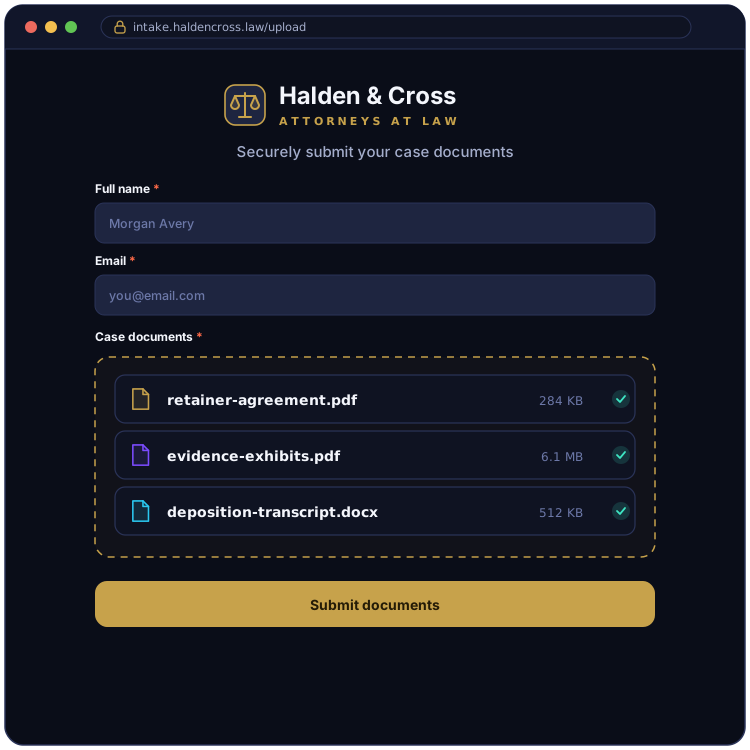
One branded form, organized by client and matter.
EZ File Drop gives your firm one branded upload form, shared as a link or embedded on your website. Clients and witnesses open it with no login, no account, and no app, then submit their documents. Everything is delivered into your firm's own Google Drive, Dropbox, OneDrive, SharePoint, Box, or FTP/SFTP server, sorted into a subfolder for that client and matter and renamed on the way in so the files match how your firm names things.
Because the documents are delivered into storage your firm already controls, your client materials stay in your own systems rather than a third-party tool. The submissions inbox keeps a dated record of what came in and when, so you always have a clear picture of each client handoff.
The features law firms lean on.

Where firms put it to work.
Collect the signed agreement, identifying documents, and case files for a new matter in one pass, all delivered into that client's folder. See how we'd set up the form.
Gather signed statements and declarations from witnesses through a form, without giving them any access to your firm's systems.
Collect documents and files from clients during discovery, sorted into the matter folder as they arrive.
Take in documents during intake and your conflict-check process, kept in their own folder until the matter opens.
Collect wills, deeds, account statements, and supporting records for estate matters in one organized place.
For firms handling transactions, gather closing documents from clients into the matter folder.
FAQ
Is this secure enough for confidential client documents?

Yes. Every upload is encrypted in transit with TLS, the same protection behind online banking, and files are delivered to a cloud account your firm connects through your provider's own OAuth2 sign-in, so we never see or store your cloud password. EZ File Drop is a delivery route rather than a storage service: a file sits in encrypted temporary staging only for as long as the delivery takes, and that copy is removed about an hour after your cloud storage confirms it has the file. Client documents end up in the account your firm already controls, not in a third-party system. There is more detail on the security page.
Do my clients need an account to upload?
No. Anyone with your form link can upload, with no account, no app, and no sign-in of any kind. Clients and witnesses open the link, add their documents, and they are done. The connection to your cloud storage belongs to your firm, and the people sending you files never see it or touch it.
Can clients upload from their phone?
Yes, and there is nothing for them to install. The form works in any mobile browser, so a client can photograph a document or pull a file from their camera roll and send it in the same pass as the rest of the intake. Photos and video are sent at full original resolution rather than the compressed version that comes through a text message, which matters when the image is going into the file.
How large a file can a client send?
5 GB per submission on Starter, and 25 GB per submission on Business and Premium. The cap covers the whole submission rather than each file, so it works out the same whether a client sends one deposition video or forty scanned exhibits, and uploaders see the limit on the form before they start rather than discovering it at the end of a long upload. If a matter needs more than 25 GB at a time, ask and we will raise it: that ceiling is a deliberately conservative default that keeps large uploads finishing reliably, not a billing limit.
How is this different from a case management system like Clio or MyCase?
It is not one, and it is not trying to be. Case management systems run your matters, your billing, and your calendar. EZ File Drop does one thing: it collects documents from clients and witnesses through a branded form with no login and delivers them into your firm's cloud storage. Most firms using it already have a case management system and use EZ File Drop for the collection step, because asking a witness or a prospective client to create a login is where document collection usually stalls.
Can I set up different intake forms for different matter types?
Yes, and there is no limit on how many. Forms are unlimited on every plan, so a family law intake can ask for different documents than a personal injury or estate matter while all of them carry the same firm branding. On the Business and Premium plans, conditional logic goes further inside a single form: fields appear or hide based on earlier responses, so one intake form can cover several matter types without asking every client everything. See Show or hide fields with conditional logic.
Can I control who submits to an intake form, and when?
Yes, on the Business and Premium plans. You can put a password on a form, so anyone opening the link has to enter it before they can see or submit anything, which is useful when a link might get forwarded past the person you sent it to. Treat it as access control rather than a guarantee about the contents, and share it the way you would share any other password. You can also schedule a form to stop accepting submissions on a set date, or close it automatically once it reaches a set number of submissions.
Will I have a record of what each client submitted and when?
Yes, on every plan. Every form has its own submissions inbox, and each submission is dated and stored with the form responses that came with it alongside every file that client uploaded, including each file's name, type, and size. There is a single search box covering your whole account, so you can find a submission by client name or file name without remembering which form it came through, and the whole record exports to CSV whenever you need it somewhere else.
Can I use this for prospective-client and conflict-check intake?
Yes. An intake form can collect the details your firm needs to run its conflict check alongside any documents a prospective client sends, and you can point that form at its own destination folder so prospective client material stays separate from open matters. On the Business and Premium plans, dynamic file organization goes further and builds a folder per prospective client automatically. EZ File Drop captures the information; running the conflict check itself stays with your firm. See Set up dynamic file organization.
Can I put the intake form on my firm's website?
Yes, on the Business and Premium plans. Every form generates an embed code that works on WordPress, Webflow, Squarespace, Wix, and anywhere else that accepts HTML, so a prospective client fills out your intake on your own site instead of being sent somewhere else to do it. The share link and QR code work on every plan if you would rather send the form to clients yourself.
Can my whole firm use one account?
Yes, on the Business and Premium plans, up to 20 users. Forms can live in a shared team workspace, and access is set form by form: a paralegal can be given access to a form's submissions without being able to change how the form is built. One thing worth checking on a shared form is its upload destination, because files are delivered to whichever teammate's connected cloud account is selected there rather than to the firm generally. For anything the whole firm relies on, point it at a shared team folder.
Which plan do I need for the law firm features?
Every plan, including Starter, connects all six upload destinations, and forms are unlimited on all three. The features most firms lean on are on Business and Premium: branded, white-labeled forms, a folder per client and matter, file renaming, conditional logic, embedding the form on your own site, and notification emails carrying your branding and your reply-to address. Sending those emails from your firm's own address needs a custom domain, which is on the Premium plan. Every new account starts with a 7-day Business trial, so you can try the whole set before deciding. Current rates are on the pricing page.
Start collecting client intake documents in your firm's cloud storage
Build one branded intake form, connect your cloud, and send clients a single link to submit everything a new matter needs.