


Set up a custom domain
A custom domain replaces our name with yours in two places. Your form links move off ezfd.app onto a subdomain of your own domain, so the address someone clicks and the page it opens are both yours. Notification emails can also send from your own address instead of ours, so the confirmation someone receives after uploading comes from you.
Custom domains are part of the Premium plan. On any other plan the Domains page shows a short explanation and a note reading "Custom domains are included in the Premium plan."
Before you start
- You need to be the team owner. Other team members can see the Domains page but cannot add or change anything.
- You need access to your domain's DNS settings, or someone who has it. You can hand the records off by email partway through, so you do not need to wait for access before starting.
- Decide which subdomain you want to use. Share links run on a subdomain, not on your main domain, so that your website keeps working normally. Something like uploads, files, or send in front of your domain is typical.
- Decide where your notification emails should send from. Setting this up is part of adding a domain rather than a later step you can come back to, and changing it afterwards means turning email sending off and starting over. Both options are covered below.
- A team can have up to five custom domains.
Add the domain
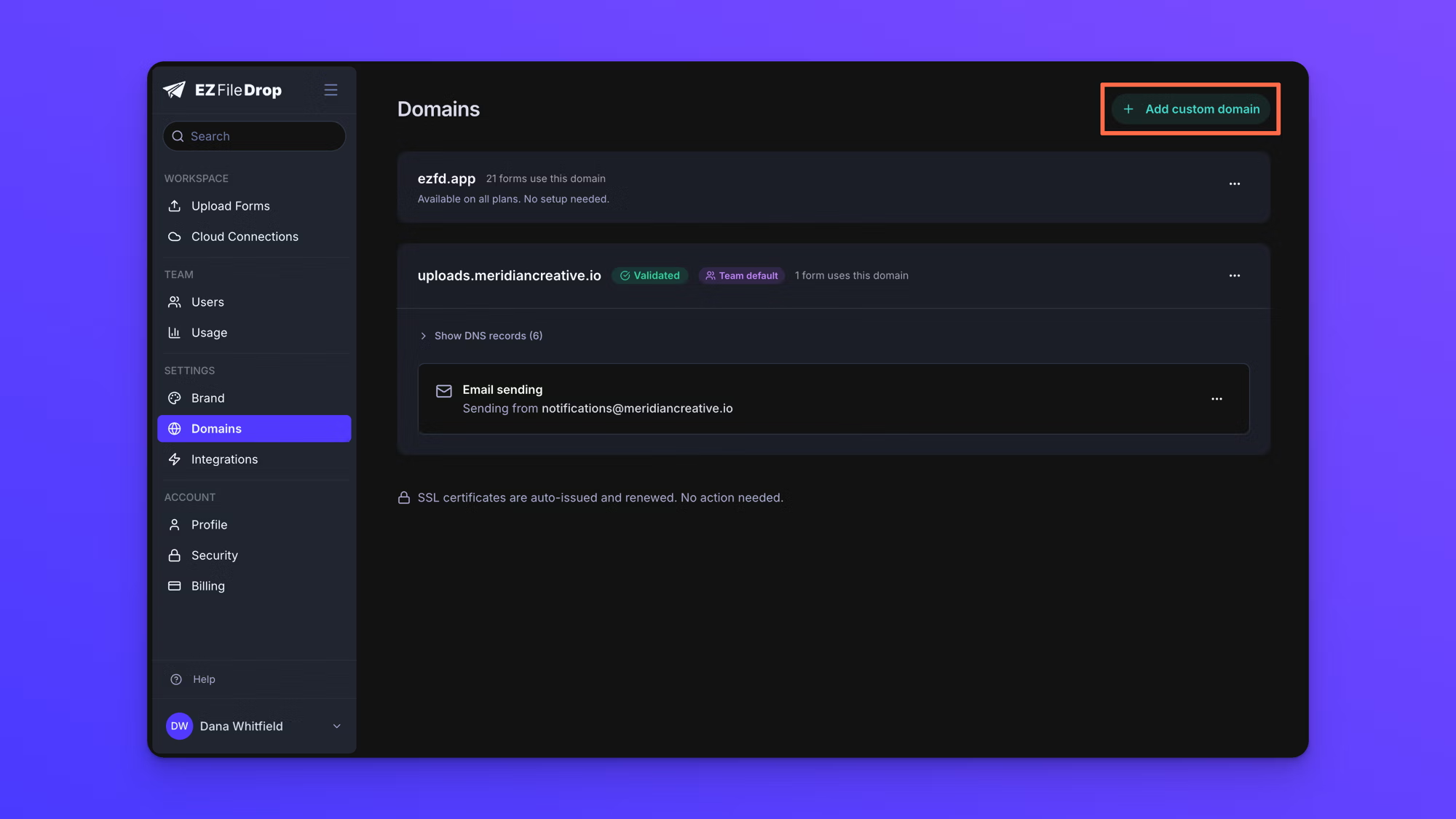
- Go to Domains in the account settings sidebar.
- Click Add custom domain.
- Enter the subdomain you want your form links to use, without
https://and without a path. - Click Continue.
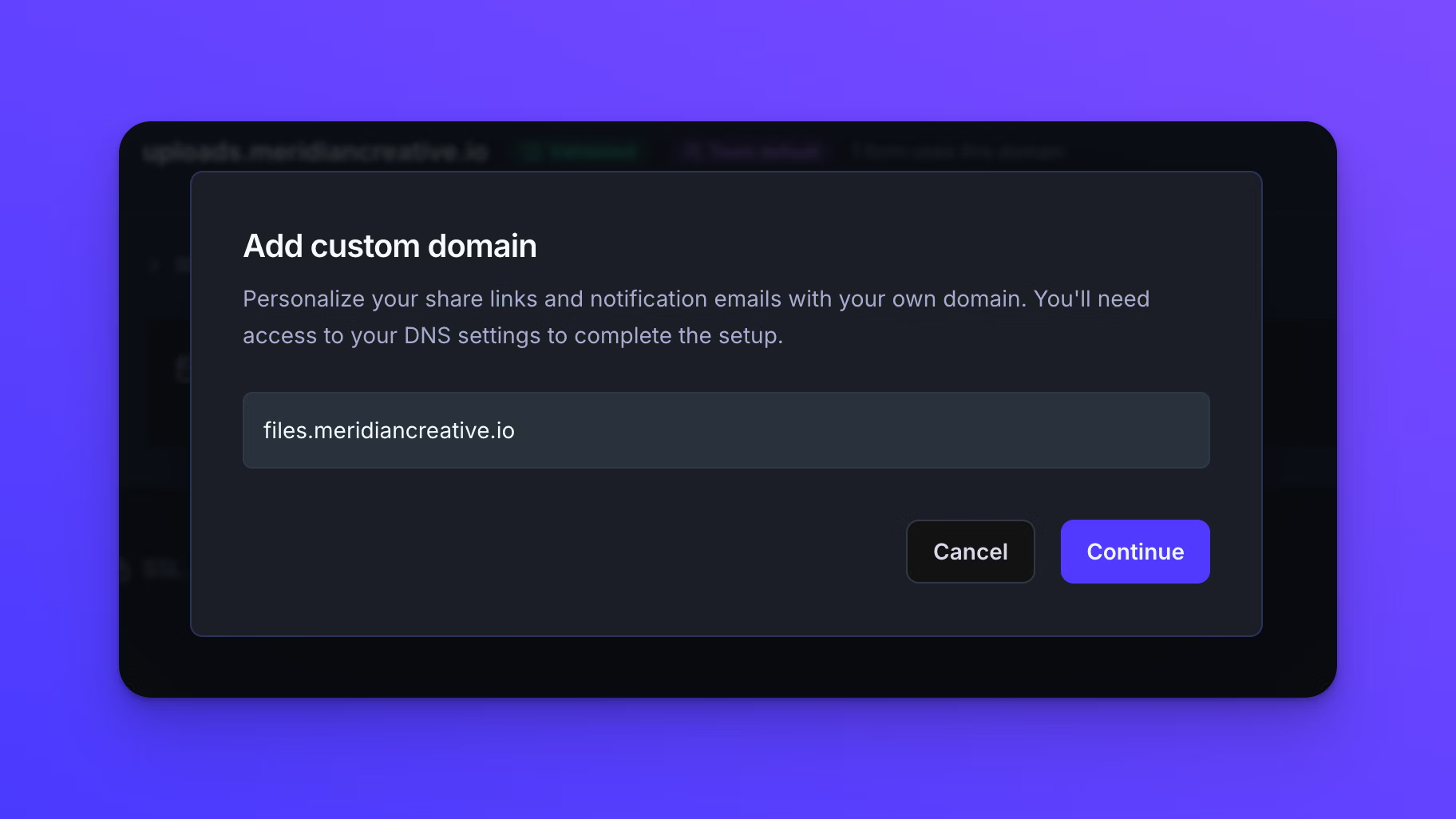
If you enter your main domain on its own, EZ File Drop will ask you for a subdomain instead and offer a few suggestions you can click. This is deliberate. Pointing your whole domain at EZ File Drop would take your website offline.
Choose your sending address
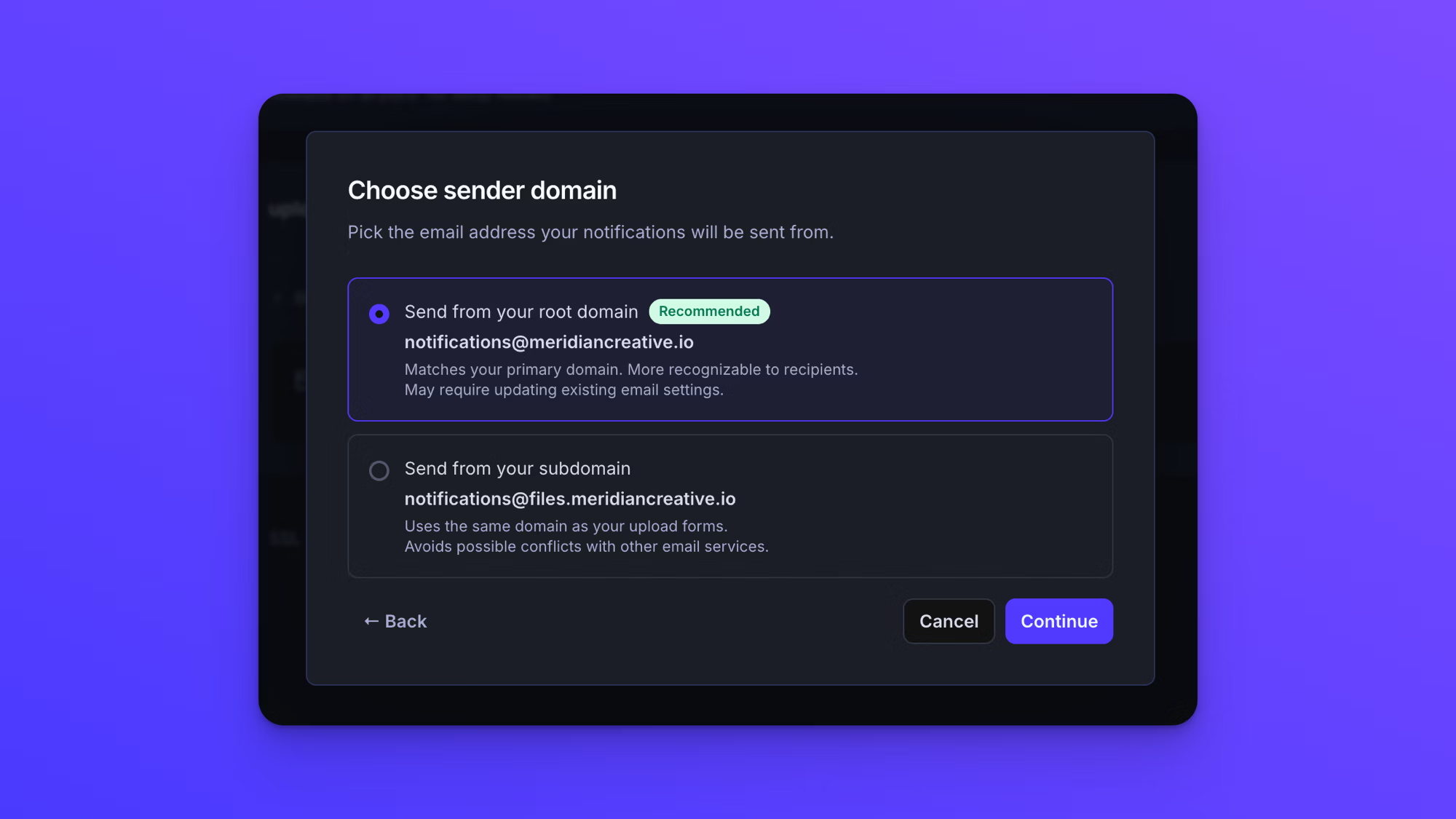
Next you pick the address your notification emails will send from. This is a required step in the flow, not an optional extra, and every domain you add gets email sending configured. Both options send as notifications@ in front of the domain you choose.
- Send from your root domain uses your main domain, so the address matches the one your clients already recognize from the rest of your email. This is the recommended option.
- Send from your subdomain uses the same subdomain as your form links. It is the safer choice if your domain is already sending email through another service, because it keeps the new records clear of your existing ones.
If you choose your root domain, EZ File Drop then checks whether that domain already sends email. A domain is allowed only one SPF record, so if you already have one, ours has to be merged into it rather than added alongside it. The app shows you what to change and waits for you to confirm you have done it.
If it finds more than one SPF record already on your domain, setup stops until you consolidate them into a single record. That is not an EZ File Drop rule. Multiple SPF records break delivery for every sender on the domain, so it has to be sorted out before going further.
Choosing your subdomain skips this check, which is why it is the safer option on a domain that is already sending email.
Either way, choose carefully. Changing this later means turning email sending off and setting it up again from scratch.
Add the DNS records
Once the domain is created you will see it listed with a Pending badge and the records it needs, split into two groups.
The Share links group makes your form links work. It points the subdomain at EZ File Drop, proves you own it, and lets us issue and renew the security certificate for it.
The Email sending group lets notifications send from your address. It signs your messages so they arrive as yours and are not treated as spam.
- Open your DNS provider in another tab.
- For each row, copy the type, name, and value across into a new record. Every field has a copy button next to it.
- Save each record at your provider.
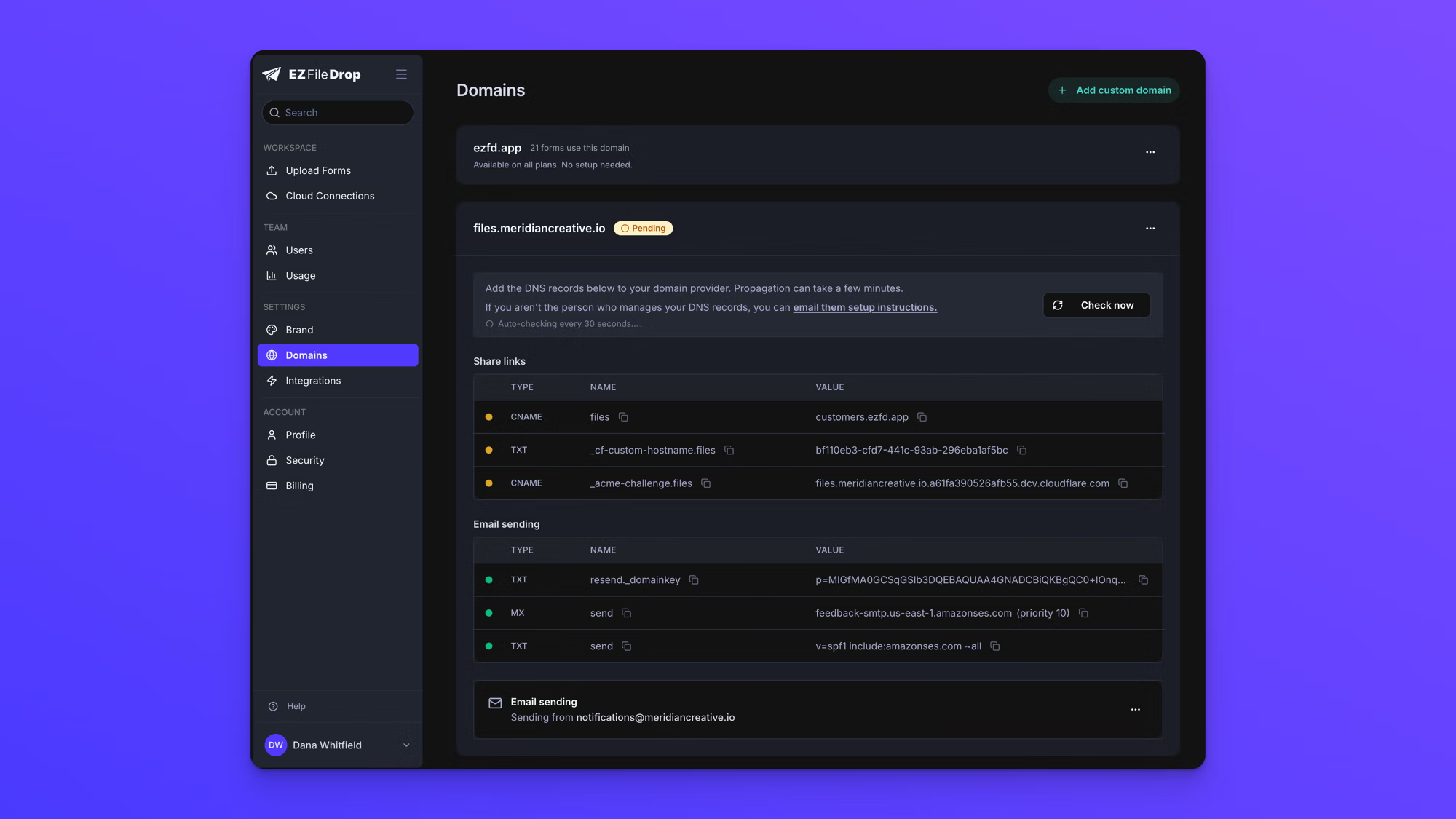
The names shown are relative to your domain, which is what most providers expect. If your provider asks for the full hostname instead, add your domain to the end of the name it shows here.
If someone else manages your DNS, click email them setup instructions. That opens a message with all the records already filled in, addressed to whoever you name, with your own address as the reply-to. You can edit the message before sending it, or copy it and send it yourself.
Wait for validation
EZ File Drop checks your records for you. While the page is open it re-checks every thirty seconds, and it keeps checking in the background after you close it. You do not need to sit and watch.
Each record has a dot showing where it stands. Amber means the record has not been found yet. Green means it has. New records usually appear within a few minutes, though some providers take longer. Once the domain has everything it needs, its badge changes to Validated.
Along the way you may see the domain report that ownership is confirmed but the security certificate is still being issued, or the reverse. Both are normal midway states and resolve on their own.
If you fix something at your provider and want an immediate answer, click Check now.
Automatic checking runs for three days. If a domain has not validated by then, checking stops and we email the team owner so it is not silently waiting forever. Correct the records and click Check now to start again.
Point your forms at the domain
Adding a domain does not move any forms onto it. Nothing changes until you say which forms should use it, and there are two places to do that: one form at a time inside the form itself, or as the default for forms you create later, back on the Domains page.
Move one form onto the domain
This part happens inside the form, not in your account settings.
- Go to Upload Forms and open the form you want to move.
- Open its Share tab.
- Use the domain dropdown to the left of the URL field and pick your custom domain.
The change takes effect straight away. You do not need to publish the form again.
Pointing a form at a custom domain gives it a new link. Its original EZ File Drop link keeps working too, so anything you shared before the move stays valid. See Share your form.
Use the domain for new forms
Back on the Domains page in your account settings, open the three-dot menu on the domain's card and make it your team default. Forms you create from then on will use it automatically.
Forms that already exist are left alone and keep whatever they are set to now, so making a domain your default is not a way to move your existing forms across. Those you move one at a time.
Each domain card also shows how many forms are using it, so you can see at a glance what you have moved.
About the security certificate
Certificates are issued and renewed automatically. You never have to buy or install one.
Leave all of the records in place after your domain validates, including the one used for the certificate. It stays in use, and renewals depend on it. Removing records after setup will take the domain back out of service.
Turning email sending on or off
Every domain you add through the flow above arrives with email sending already configured. If a domain's email section shows Off with an Enable button, sending was either turned off later or did not finish setting up when the domain was added. Enable takes you back through the same sending-address choice.
Turning it off later stops notifications sending from your address and returns them to the default EZ File Drop sender. Your form links are not affected. The email records at your provider stop being used, and you can remove them at your convenience. See Set up email notifications.
Remove a domain
Removing a domain is deliberate and takes a confirmation, because links on it stop working immediately.
- Open the three-dot menu on the domain's card and choose Remove custom domain.
- Read the summary of what will be affected. It lists which forms are using the domain and who owns them.
- Type
REMOVEto confirm.
Your forms are not deleted. They go back to their default EZ File Drop links and keep accepting uploads. What breaks is any link on the removed domain, so anyone holding one will need the new address. If email sending was on, notifications return to the default sender.
Setting the domain up again later means adding it and adding the DNS records over again.