


Delete a user and reassign forms
Deleting a user ends their access to your team and permanently deletes part of their work. Before the deletion goes through, you reassign or delete each form they own in the team workspace. Only team owners can delete users.
Deleting a user cannot be undone.
What happens to their forms
Forms the user owns in the team workspace can be reassigned to another teammate or deleted. You choose one or the other for every form before the deletion completes.
Forms in their private workspace are always permanently deleted, along with the submission records attached to them. There is no option to keep or transfer a private form. Anything worth keeping needs to be moved into the team workspace or exported before you delete the user.
Reassigning a form moves it to the new owner, sets it back to "Draft", and clears its upload destination. The new owner has to choose an upload destination and publish the form again before it accepts submissions. This happens because the original destination pointed at the departing user's own cloud account, which is removed along with the user.
Submission records on a reassigned form are kept. Submission records on a deleted form are deleted with it. Files already delivered to your upload destination are never affected, because they live in your own cloud storage.
What else is removed
Deleting a user also removes their connected cloud accounts, their personal color libraries and custom themes, and any permissions they held on other users' forms.
Delete a user
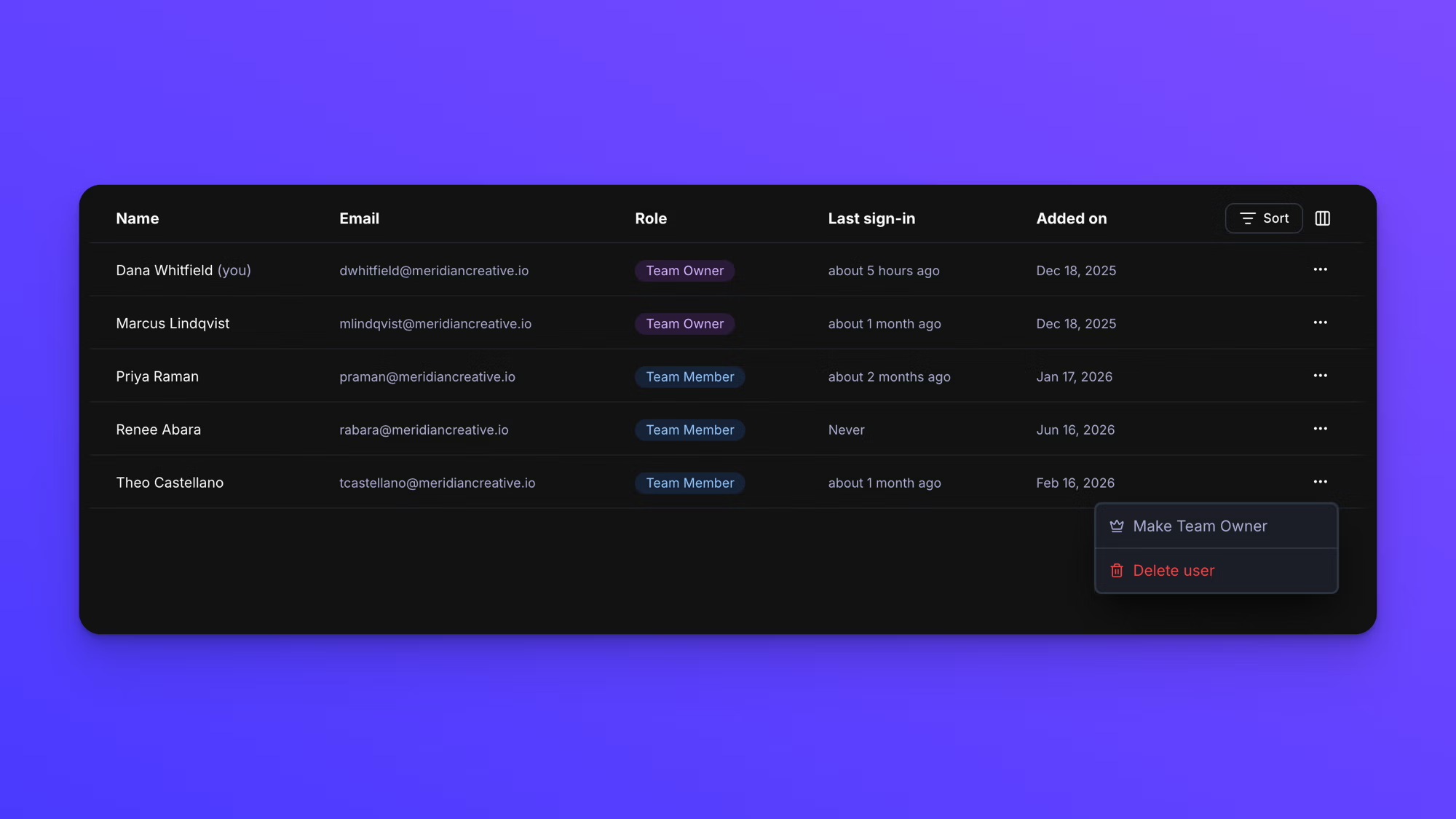
- In the left sidebar under TEAM, click Users.
- Find the user's row and click the three-dot button at the end of it.
- Click Delete user.
- Wait while the dialog works out which forms they own. It reads "Checking owned forms…" until the check finishes.
- For each shared form listed, open the dropdown beside it and choose the teammate to reassign it to, or choose Delete form.
- Type DELETE in the confirmation field.
- Click Delete User.
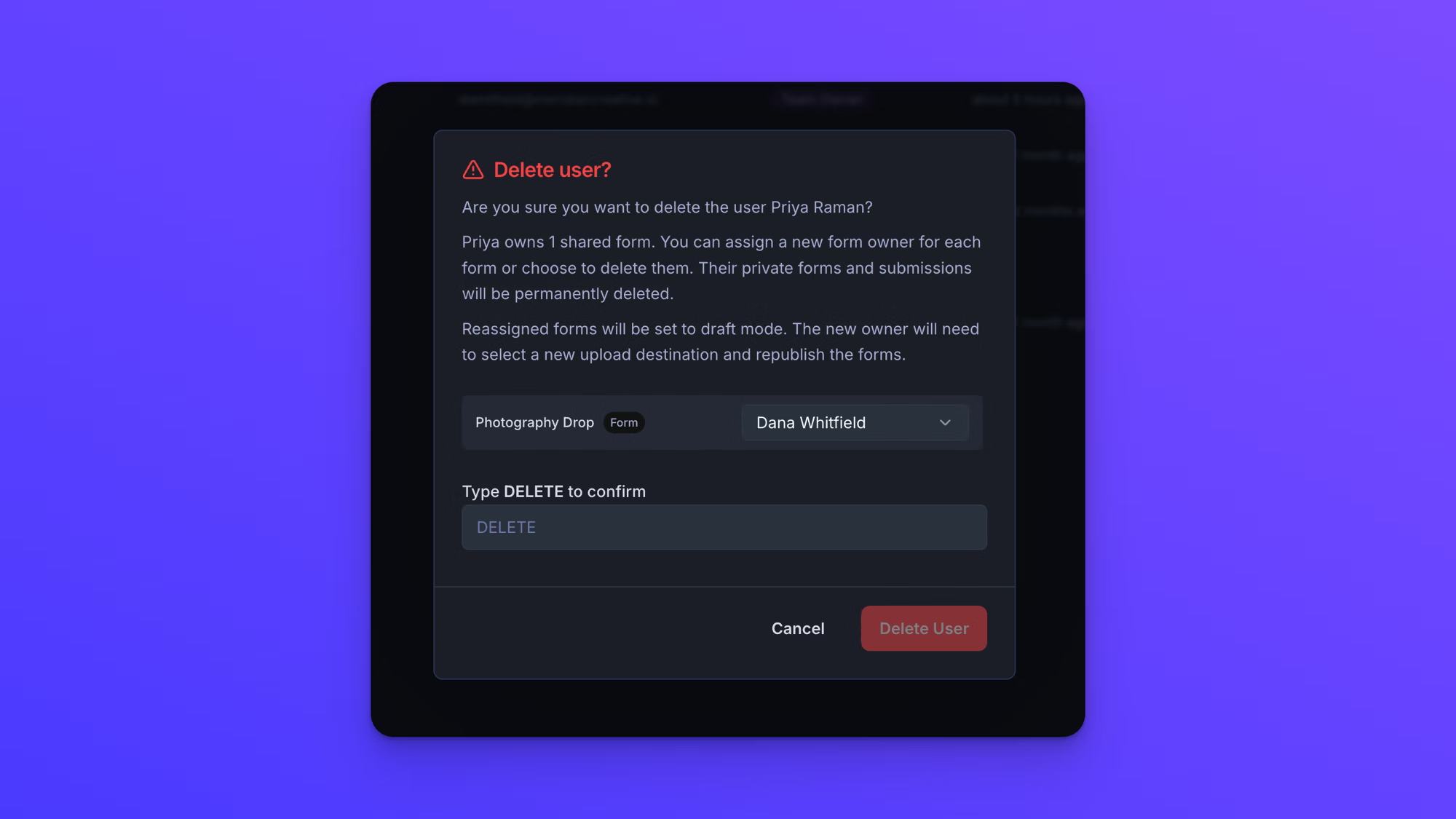
Delete User stays greyed out until every shared form has been reassigned or marked for deletion, and the confirmation field reads DELETE.
If the user owns more than five shared forms, a "Reassign all forms to:" control appears above the list so you can reassign every form to one user, or delete them all, in a single choice.
What the dialog tells you
If a user does not own any shared forms, the dialog reads "They will lose access to your team immediately. Any private forms and submissions they own will also be permanently deleted."
If a user does own shared forms, the dialog names the count and adds "Reassigned forms will be set to draft mode. The new owner will need to select a new upload destination and republish the forms."
A line near the bottom states how many private forms will be deleted regardless of your choices, in the form "3 private forms will be permanently deleted."
Behavior notes
- A team must always keep at least one team owner. If the user you are deleting is the only owner left, promote another user first. Trying without doing that returns "Your team must have at least one Team Owner. Promote another user to Team Owner first."
- Team members cannot delete users, and cannot open the Users page at all.
- There is no way for a user to leave a team on their own. A team owner has to delete them.
- Once the deletion completes, the user's email address is free to use for a new invitation. Their old forms and submission records are not restored.