
What's new
Everything we've shipped to EZ File Drop, newest first.
Check back here for new features, improvements, and fixes.
The form data text file was saved to the wrong folder on FTP and SFTP servers
We fixed a bug that affected a very specific combination: forms with Save form data as text file turned on, using dynamic subfolders, with an FTP, FTPS or SFTP server as the upload destination. If your form doesn't match all three, you were never affected. Google Drive, Dropbox, Box, OneDrive and SharePoint destinations were fine throughout.
For that small group, the text file was saved under the server's root folder, instead of being saved with the uploaded files. It's now delivered into the same folder as the files, and Save to a different location respects the FTP or SFTP folder you picked. Text files already saved in the wrong place weren't moved, so if this describes your form, it's worth a look in your server's base folder.
The fix is automatically applied to all new submissions and no action is required.
Google Sheets: choose your columns, set the row layout, and link any sheet safely
Your Google Sheet can now be laid out the way you actually use it, not the way the form happens to be built. Pick which form fields are written to the sheet and put them in whatever order suits your workflow, so a sheet that feeds a report or an automation holds exactly the columns it needs and nothing else. You'll find this under Choose columns in the Google Sheet card.
Multi-file submissions are more flexible too. If you'd rather count submissions than files, or you want the answers listed once instead of repeated on every row, Rows for multi-file submissions gives you three layouts: one row per file with the answers on each (the current behavior), the answers on the first row only, or the whole submission on a single row with the files together in one cell.
Linking a sheet you already have is safer. EZ File Drop checks the sheet first and, if it has content, tells you exactly which tab will be cleared before you confirm. You can also rename or move the tab the form writes to without breaking syncing. Creating or linking a sheet adds your existing submissions in the same step, and the card shows Rebuilding… while it fills so you know it's working.
If your sheet already has rows, changing the columns or row layout asks you to rebuild it so every row matches, or you can undo and leave the sheet as it is. Forms you don't touch keep working exactly as they do today.
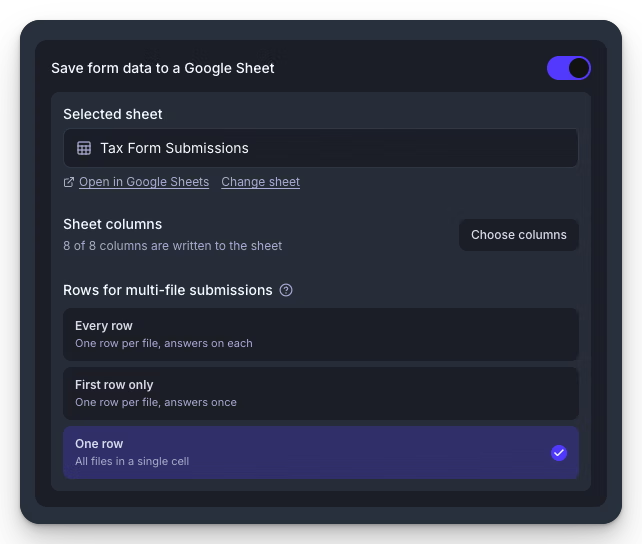
Before this, every sheet got every form field in the order they appeared on the form, a multi-file submission always meant one row per file with the answers repeated, and the tab had to stay named Sheet1.
Improved submission statuses, and partial uploads are delivered faster
When someone uploads five files and their connection drops before the last two files upload, you now get the three. They're delivered within a few minutes, the submission is marked Incomplete, and a Partial Upload email is sent to tell you what arrived and what's missing so you can follow up with the uploader instead of asking them to start over. Webhooks and Zapier still fire, with the status set to partial so your automations can tell the difference. The email follows the form's failure notification setting.
Statuses are clearer across the board. Submissions now read Uploading (the browser is still sending files), Transferring (files are being delivered to your storage), Completed, Incomplete or Failed, and small chips above the table filter to the Incomplete and Failed ones in a click, so problem submissions don't hide in the list.
Before this, in-progress submissions showed Pending, and a multi-file upload that stopped partway sat for up to 12 hours waiting for the upload to finish before it was marked Failed even though good files had arrived.
Embed codes now use JavaScript, with better auto-sizing, query parameters, transparent backgrounds and faster loading
Embed codes have moved from a pure iframe to a JavaScript embed method, and embedded forms are better for it in four ways.
Auto-sizing is more reliable. URL query parameters now work on embedded forms. A new transparent background option is available so embedded forms can sit flat on your page. And embedded forms load significantly faster than before.
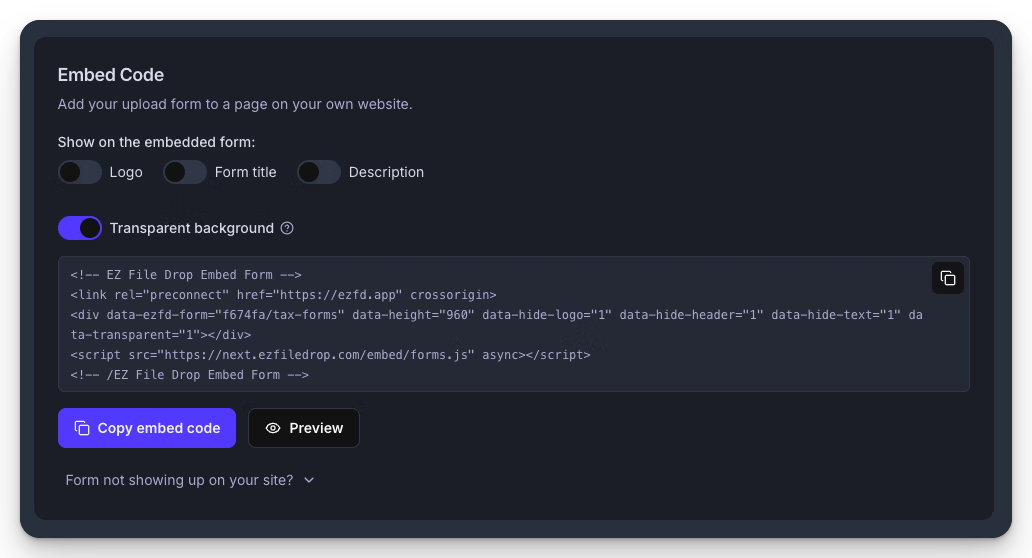
Before this, embedding used an iframe with a separate resize script, query parameters didn't work on embedded forms, and there was no transparent background option.
The pure iframe embed code is still available for pages where JavaScript is blocked or not supported.
Embed codes already on your site keep working. To get the benefits of the new embed codes, copy the new code from the Share tab and update the site where your form is embedded.
Embed codes are available during the Business trial
You can now embed a form on your own site during the trial and see how it fits before choosing a plan. The Embed Code card on the Share tab is fully unlocked for trial teams; while on trial, embedded forms show the usual trial banner.
Page header is now Form title, and Page text is now Description
Two settings in the form builder got renamed for what they actually do. Form title and Description replace Page header and Page text everywhere: Form Setup, Style mode, the embed display switches and the tooltips. Your content and settings are unchanged; only the labels changed.
A clear message when a private or incognito window blocks the Google Drive picker
Private windows and browsers that block third-party cookies usually won't let Google's folder picker open. When that happens, you now see Your browser is blocking Google Drive, with what to do about it (use a normal window or allow cookies) and a Try again button. Normal browsers see no change. Before this, Google showed its own error about an invalid API developer key, which was misleading and didn't give any information about what the problem was or how to fix it.
Picking an upload destination takes fewer steps
If you only have one cloud account connected, selecting an upload destination on a file upload field now opens the folder picker directly. This small change removes three unneceeasry clicks from the process. Since most EZ File Drop users only have one cloud account connected, this small change will save most users several seconds every time they create a new form. Small savings add up.