


Redirect uploaders after submission
A redirect sends uploaders to a page of your own after they submit your form, in place of the success screen EZ File Drop would otherwise show. Redirects are available on the Business and Premium plans.
You need an upload form to work in. If you have not made one yet, start with Create your first upload form.
Turn on a redirect
- On the Upload Forms page, open your form.
- In the Build tab's left menu, click Form Setup.
- Scroll down to Redirect after submission, below Save form data to a Google Sheet, and turn the toggle on.
- Enter the full address of the page you want uploaders to land on, starting with
https://. - Changes save automatically. Publish them with Publish changes.
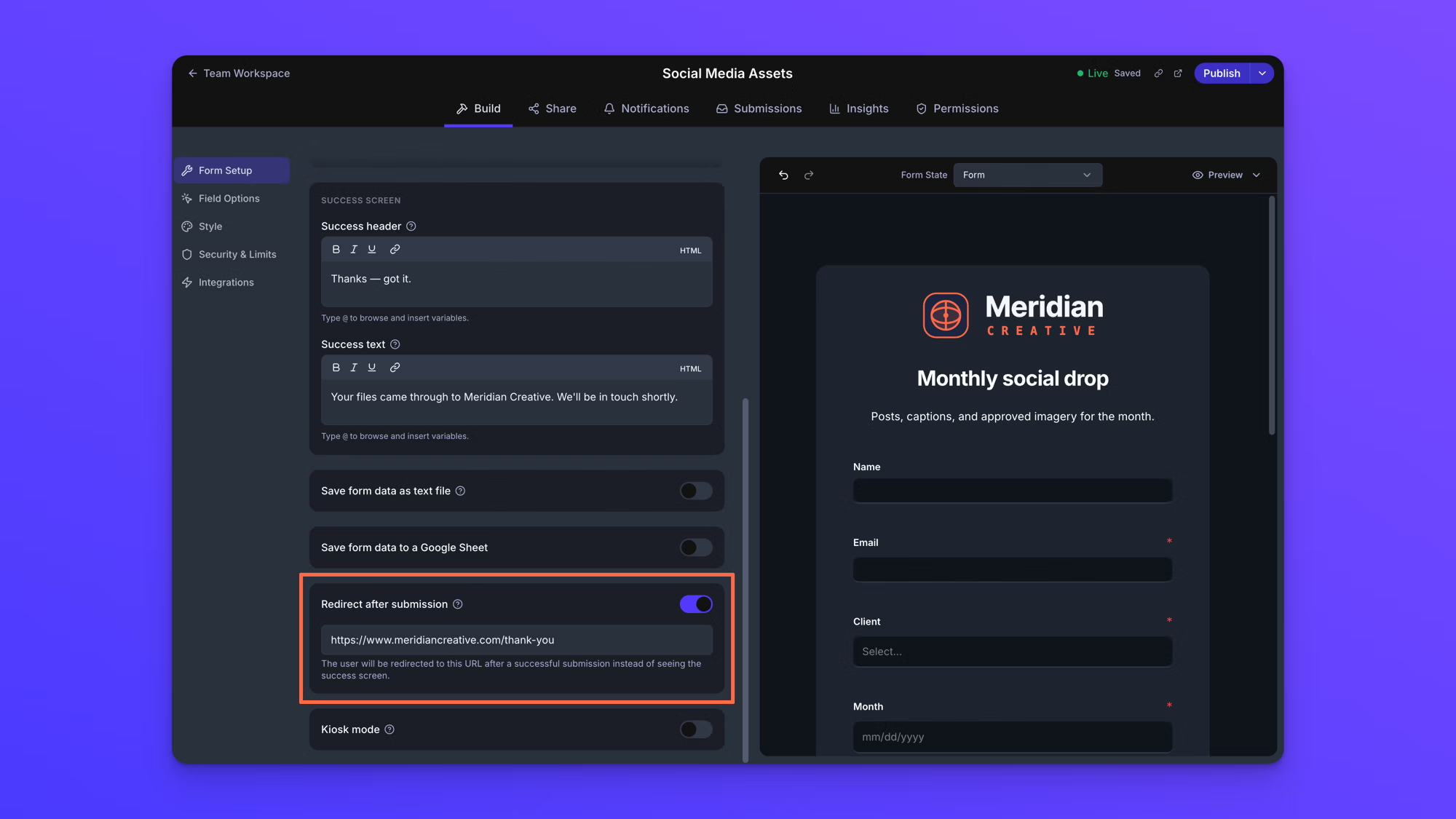
Always enter a full URL
Type the address the way it appears in a browser. If you leave off the https://, it is added for you when what you typed looks like a web address, so example.com/thank-you becomes https://example.com/thank-you. Anything after the domain is kept exactly as you typed it. If the address cannot be completed, a message appears under the field explaining what is missing, and the form cannot be published until it is fixed. An address that fails this check is not saved, so correct it before you leave the panel.
Open the address in a browser on its own to confirm it works, then submit a test file through your form to confirm uploaders arrive where you expect.
What uploaders see
The redirect happens at the point the success screen would have appeared, once the upload finishes. There is no delay and nothing shown in between.
The success screen does not appear at all, so Success header and Success text in Form Setup are not used while a redirect is on. Their wording stays saved and is used again if you turn the redirect off. Anything you want uploaders to know after submitting belongs on the page you send them to.
Pass information to your page
Nothing is added to the address you enter. EZ File Drop does not append a submission ID or a status, and it does not pass along the answers someone gave, so your page receives no information about the submission itself.
A query string you type yourself is kept exactly as written, which is how you mark the traffic as coming from your form. An address ending in ?source=upload-form reaches your page as typed, where your own analytics can read it.
Variables do not work in this field. The @ variables you can insert into Success header and Success text are not read here, and typing one sends uploaders to an address that contains the variable text instead of a value.
Redirect or kiosk mode
A form uses one or the other. Kiosk mode keeps uploaders on the form so the next person can submit, and a redirect sends them away from it, so a form cannot do both. Turning the redirect on while kiosk mode is on asks you to confirm, and confirming turns kiosk mode off. Its reload time and message are kept, so kiosk mode works as before if you switch back. See Turn on kiosk mode.
Behavior notes
- Turning Redirect after submission off empties the field, and turning it back on in the same sitting puts the address back. Once you have left the form and come back, it is gone for good, so keep a copy of the address if you expect to use it again later.
- With the toggle on and the field left empty, the form behaves as though the redirect were off and uploaders see the success screen. The same happens if the saved address is not a complete one.
- On a form embedded in your website, the redirect normally takes the whole page, the same as it would on the form's own link. If your site is set up to stop an embed from changing the page around it, the destination loads in the space the form occupied instead. See Embed a form on your website.
- If an upload does not finish, uploaders stay on the form with an error and the redirect does not happen.
- The uploader confirmation email, if the form sends one, is not affected by a redirect. See Set up email notifications.
- Redirects are part of the Business and Premium plans. If a form moves to the Starter plan, uploaders see the success screen instead of being sent to your page. The address you saved is kept, and it starts working again on Business or Premium.
- Changes to a redirect are saved automatically a moment after you make them, and the indicator at the top of the form reads "Saving…" and then "Saved". Saving is not publishing. A Live form keeps showing its last published version until you click Publish changes in the top right.