
File collection for nonprofits, without the accounts.
No credit card required · 7-day Business plan trial
Files come in from everyone, and almost no one has an account.
Nonprofits collect files from everyone they touch: volunteers at an event, donors sending paperwork, program staff assembling a grant application, board members returning signed policies. Almost none of those people have an account in your systems, so the default is email, social DMs, and shared links that scatter files everywhere.
The result is photos buried in inboxes after a fundraiser, grant documents arriving in a dozen formats days before a deadline, and a staffer or volunteer spending hours downloading and refiling it all by hand. For an organization running on limited time, that's time not spent on the mission.
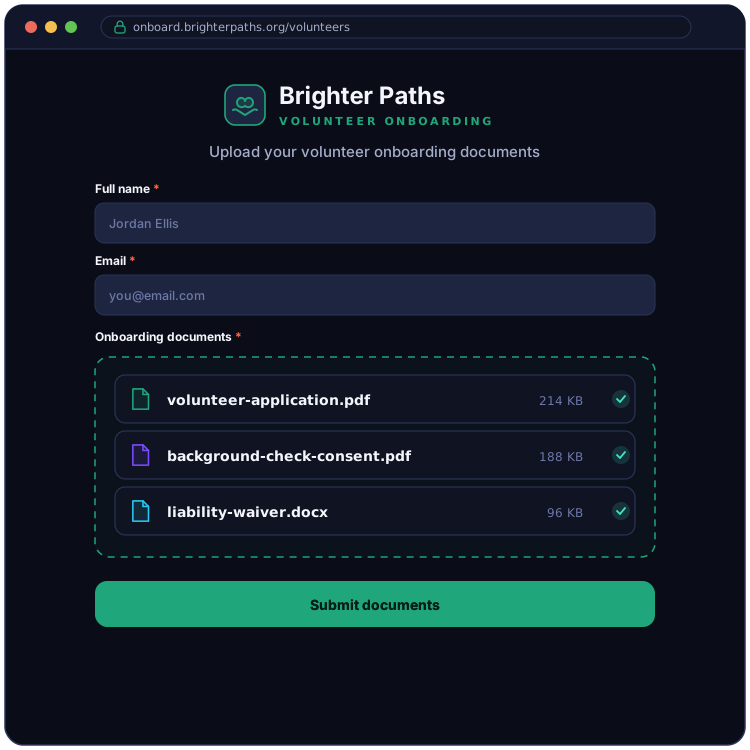
One branded form, no logins, organized by campaign.
EZ File Drop gives your organization one branded upload form, shared in an email newsletter, posted to social, or printed as a QR code on an event flyer. Volunteers, donors, board members, and program participants open it with no account and no app, then submit their files. Everything is delivered into your organization's own Google Drive, Dropbox, OneDrive, SharePoint, Box, or FTP/SFTP server, sorted automatically by campaign, program, or contributor.
Because nonprofit work runs in cycles, you can schedule a form to open when a campaign starts and close itself when the drive ends, and route a fundraising form, a program form, and a board form to separate destinations. And since files are delivered into the cloud account your organization already owns, they stay under whatever document-retention practices your board expects.
The features organizations lean on.

Where organizations put it to work.
Collect photos and video from volunteers and attendees during a campaign or event, gathered into one folder instead of scattered across inboxes and phones.
Gather waivers, identification, and signed agreements from new volunteers in one place, ready before their first shift.
Collect the supporting documents a grant requires from program staff and partners, organized before the deadline.
Collect pledge forms, matching-gift requests, and supporting documents from donors into one organized place.
Gather meeting materials and signed policies from board members into the right folder.
Collect photos, video, and written stories from mission trips and ministry programs for newsletters and annual reports.
FAQ
Will volunteers and donors need to create accounts?

No, never. Anyone with the form link can upload, with no account, no app, and no sign-in of any kind. Volunteers, donors, and community members open the link, submit their files, and they're done. The cloud connection is your organization's alone.
Is this secure for donor and program information?
Yes. Every upload is encrypted in transit with TLS, and files are delivered to a cloud account your organization connects through your provider's own OAuth2 sign-in, so we never see or store your password. EZ File Drop is a delivery route rather than a storage service: a file sits in encrypted temporary staging only for as long as the delivery takes, and that copy is removed about an hour after your cloud storage confirms it has the file. Submissions end up in the cloud account your organization already controls, not in a third-party system. There is more detail on the security page.
Can supporters upload from their phone?
Yes, and there is nothing for them to install. The form works in any mobile browser, so a volunteer at an event can scan the QR code on a flyer, pick photos from their camera roll, and send them before they leave. Photos and video are sent at full original resolution rather than the compressed version that comes through a text message, which matters when an image is going into a newsletter or an annual report.
How large a file can someone send?
5 GB per submission on Starter, and 25 GB per submission on Business and Premium. The cap covers the whole submission rather than each file, so a volunteer sending 300 event photos in one go is measured the same as someone sending a single video. Uploaders see the limit on the form before they start rather than discovering it at the end of a long upload. If a campaign needs more than 25 GB at a time, ask and we will raise it: that ceiling is a deliberately conservative default that keeps large uploads finishing reliably on ordinary connections, not a billing limit.
Can we run separate forms for different campaigns at the same time?
Yes. Build as many forms as you want on every plan, each branded the same and pointed at its own folder, so several campaigns, programs, or events can each have their own upload link running at once.
Can donors upload without giving their name?
Yes. You decide which form fields are required, so you can make name and contact fields optional and let a donor submit anonymously. EZ File Drop captures whatever they choose to provide.
Can several staff members share the submission inbox?
Yes, on the Business and Premium plans. Add up to 20 team members and use granular per-form permissions so each staffer or volunteer sees only the forms they're working on. See Set form permissions.
Does this work with Google for Nonprofits or a Microsoft 365 nonprofit account?
Yes, both. Files are delivered into your organization's Google Workspace Drive or Microsoft 365 OneDrive, including the accounts that come with Google for Nonprofits or a Microsoft nonprofit grant, and Dropbox, SharePoint Online, and Box work the same way. You connect the destination once and every submission is delivered there automatically. One thing worth knowing: some Microsoft 365 tenants are set up so an administrator has to approve third-party apps before anyone can connect them. If your connection is blocked, that is why, and it clears as soon as whoever manages your tenant grants consent.
Will we have a record of what came in and when?
Yes, on every plan. Every form has its own submissions inbox, and each submission is dated and stored with the form responses that came with it alongside every file that was uploaded, including each file's name, type, and size. There is a single search box covering your whole account, so you can find a submission by a contributor's name or a file name without remembering which form it came through, and the whole record exports to CSV whenever you need it in a spreadsheet.
Which plan do we need for the nonprofit features?
Every plan, including Starter, connects all six upload destinations and lets you build unlimited forms. The features most organizations rely on, like branded forms, a folder per campaign, form scheduling, and team access, are part of the Business and Premium plans. All new accounts start on a 7-day Business trial. Current rates are on the pricing page.
Start collecting files in your organization's cloud
Build one branded form, connect your cloud, and share a single link with your volunteers, donors, and program staff.