
Agency client onboarding without the asset-collection chaos.
No credit card required · 7-day Business plan trial
Onboarding a new client shouldn't be a scavenger hunt.
Agency client onboarding is the process of gathering everything you need from a new client before the work starts: brand assets, account access, approved messaging, and the answers that shape the engagement.
In practice, it's scattered. Intake questions live in a Google Form, a Typeform, or a PDF; assets come in over email and Slack; and approvals get buried in a thread. Files arrive with no consistent naming, and someone on your team sorts them into the right client folder by hand. Run that across ten, twenty, or fifty active clients and onboarding becomes a tax on every new engagement, with launches stalling because the assets are still sitting in someone's inbox.
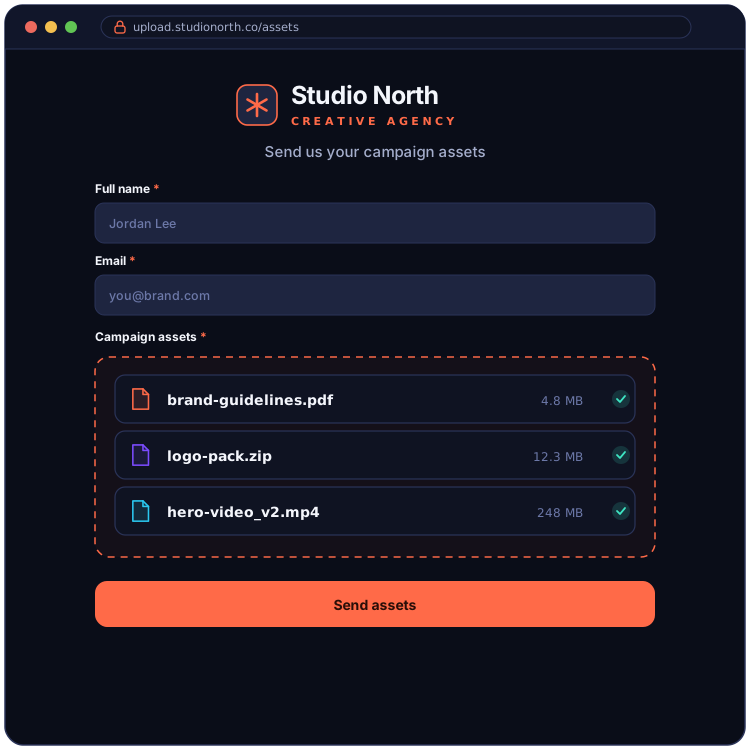
One branded form, every client, organized automatically.
EZ File Drop gives your agency one branded form that combines an onboarding questionnaire and asset uploads in a single flow. Build a master template once, then duplicate it for each new client, so onboarding a new engagement takes minutes instead of rebuilding a form and a separate upload link every time.
Conditional logic and multi-page forms keep a long intake clean: a client only sees the questions and upload fields that apply to the kind of work you're starting. Everything they submit is delivered into their own subfolder in your agency's Google Drive, Dropbox, OneDrive, SharePoint, Box, or FTP/SFTP server, organized automatically by client and then by project. If you manage clients across more than one cloud account, multi-account routing lets a single agency login point each form wherever it belongs, so files end up in the right place without anyone moving them by hand.
The features agencies actually use.

Where agencies put it to work.
Send one form that gathers brand assets and intake answers in a single flow, matched to the kind of work you're starting, all delivered into the client's folder.
Collect logos, fonts, photography, and video from a client up front, so your team has the source files in one organized place from day one.
Gather briefs, hero images, and copy approvals before a launch, so nothing is stuck in an inbox when it's time to ship.
Receive finished designs, photos, and video edits from your freelance network through a form built for exactly what you need back.
Collect a client's posts, captions, and approved imagery on a recurring link instead of chasing them across email and DMs.
Gather customer quotes, results, and supporting files for case studies and testimonials in one place.
FAQ
Is this secure enough for confidential client work?

Yes. Every upload is encrypted in transit with TLS, and files are delivered to a cloud account your agency connects through your provider's own OAuth2 sign-in, so we never see or store your cloud password. EZ File Drop is a delivery route rather than a storage service: a file sits in encrypted temporary staging only for as long as the delivery takes, and that copy is removed about an hour after your cloud storage confirms it has the file. Confidential and unreleased work ends up in the cloud account your agency already controls. There is more detail on the security page.
Do my clients need an account to upload?
No. Anyone with your form link can upload, with no account, no app, and no sign-in of any kind. Your clients open the link, drop their files, and they're done. The cloud connection is yours alone, and they never touch it.
How large a file can a client send?
5 GB per submission on Starter, and 25 GB per submission on Business and Premium. The cap covers the whole submission rather than each file, so a freelancer sending one 20 GB video and a client sending 400 photos are measured the same way. Uploaders see the limit on the form before they start rather than discovering it at the end of a long upload. If a project needs more than 25 GB at a time, ask and we will raise it: that ceiling is a deliberately conservative default that keeps large uploads finishing reliably, not a billing limit.
Can I create a separate branded form for every client?
Yes. Build as many forms as you want on every plan, each with its own branding, fields, and destination folder. Most agencies keep a master onboarding template and duplicate it per client, so a new engagement is ready in minutes.
Can each form send files to a different cloud account?
Yes. Multi-account routing lets you connect more than one cloud account to a single agency login and point each form wherever it belongs, whether that's the agency's own folder or a folder a client has shared with you. One login manages every destination. See Connect multiple cloud accounts.
Can the upload link use our agency's domain?
Yes, on the Premium plan. Your share links and email notifications can run on your agency's own domain, so the whole experience reads as yours from the first click to the confirmation email.
Can I embed the form on our Webflow, WordPress, or Squarespace site?
Yes, on the Business and Premium plans. Every form generates an embed code that works on any site accepting custom HTML, including Webflow, Squarespace, and Wix, and the embedded form keeps your branding and the same upload destination. One thing to watch on WordPress: the free, Personal, and Premium tiers of WordPress.com strip embed code, so you need a WordPress.com Business plan or a self-hosted site. The share link and QR code work on every plan if you would rather not embed at all. See Embed a form on your website.
Will I have a record of what each client sent and when?
Yes, on every plan. Every form has its own submissions inbox, and each submission is dated and stored with the form responses that came with it alongside every file that client uploaded, including each file's name, type, and size. There is a single search box covering your whole account, so you can find a submission by client name or file name without remembering which form it came through, and the whole record exports to CSV whenever you need it somewhere else.
Can my whole team use one account?
Yes, on the Business and Premium plans, up to 20 users. Forms can live in a shared team workspace, and access is set form by form: an account manager can be given access to one client's submissions without being able to change how the form is built. One thing worth checking on a shared form is its upload destination, because files are delivered to whichever teammate's connected cloud account is selected there rather than to the agency generally. For anything the whole team works out of, point it at a shared team folder.
Which plan do I need for the agency features?
Every plan, including Starter, connects all six upload destinations and lets you build unlimited forms. The features most agencies rely on, like branded forms, folder-per-client organization, conditional logic, embedding, Zapier, and webhooks, are part of the Business and Premium plans. A custom domain on your upload links is available on Premium. All new accounts start on a 7-day Business trial. Current rates are on the pricing page.
Onboard your next client in minutes
Build one branded form that collects assets and intake answers, connect your cloud, and send it to your next client.