
How to Have Wedding Guests Upload Photos to Google Drive
Your photographer will cover the ceremony and the portraits. Your guests will catch everything else: the toast that brought the room down, the dance floor at midnight, your grandmother laughing at table six. Here's how to have wedding guests upload photos to your Google Drive from their phones, with one QR code and no app or account to download. We compare the three common approaches first. If you've already decided on your own Google Drive, jump to the setup steps for building an EZ File Drop upload form.
Three ways to collect wedding photos from guests
Most couples end up choosing between three approaches. They differ less in how photos get collected and more in where the photos end up and how long you get to keep them.
A shared album in Google Photos or iCloud
A shared album is free and familiar. In Google Photos, you turn on Collaborate and share the album's link, and anyone with the link can add photos. Apple's iCloud Shared Albums now let friends add photos on the web without an Apple Account. That works on albums created or upgraded in iOS 27 or later.
The catch is that the photos live inside the album, not as files you own outright. In Google Photos, they stay tied to the guest who added them. Google's help center says that when someone leaves a shared album, the photos and videos they added "will be removed."
iCloud adds a quality catch. Shared albums created before iOS 27 shrink every photo to 2048 pixels on the long edge and play videos at up to 720p, so you don't get the originals back. Albums created or upgraded in iOS 27 keep full resolution, but then everything guests add counts against your iCloud storage.
A wedding photo sharing app
Apps like GuestPix, Wedibox, and Kululu are built for exactly this event. Guests scan a QR code, upload in the browser, and see everyone's photos in a live gallery. Many add a slideshow for the reception screen, a guestbook, or video messages.
You pay a one-time fee per event. The gallery stays up for a set window, from a few months to two years depending on the plan. After that, you download everything to keep it. Until you do, the photos live on the app's service.
An upload form that delivers to your Google Drive
An upload form is the third option, and it's what EZ File Drop does. Guests scan a QR code, choose photos and videos, and tap submit. Every file is delivered in full resolution to a folder in your own Google Drive.
There's no live gallery. Guests don't see each other's uploads unless you share the folder afterward. In exchange, the originals are yours from the first upload, with no hosting window and nothing to export later.
Couples who care most about the reception experience tend to pick an app. Couples who care most about keeping every original file tend to pick their own Google Drive. The rest of this guide is for the second group.
How to have wedding guests upload photos to Google Drive
Google Drive doesn't give you an upload-only link for guests. A shared folder asks every guest to sign in, and anyone with edit access can rename or delete what others added. An upload form sits in front of the folder and takes care of both problems.
1. Connect your Google Drive
In EZ File Drop, click Cloud Connections in the left sidebar and connect Google Drive. A personal Gmail account works fine. Create a folder for the wedding first, such as "Wedding Photos," so the uploads don't mix with your other files. See connect Google Drive.
2. Create the form and keep it short
Click Upload Forms, then Create upload form, and name it after your wedding. Every field you add is one more step for a guest at the bar, so keep it to three:
- Name. So you know who sent what.
- Long Text, labeled "A note for the couple" and left optional. Guests leave lovely messages here.
- File Upload. A new form already includes one.
On most forms, we recommend an Email field too, because it sends each uploader a confirmation once their files are delivered. For a wedding, we'd skip it. The form only reaches guests through your QR code, and every field you ask a guest to type at a reception costs you uploads. You still get an email for every submission, with the guest's name, their note, and the files they sent.
See add form fields and email notifications.
3. Send the files to your wedding folder
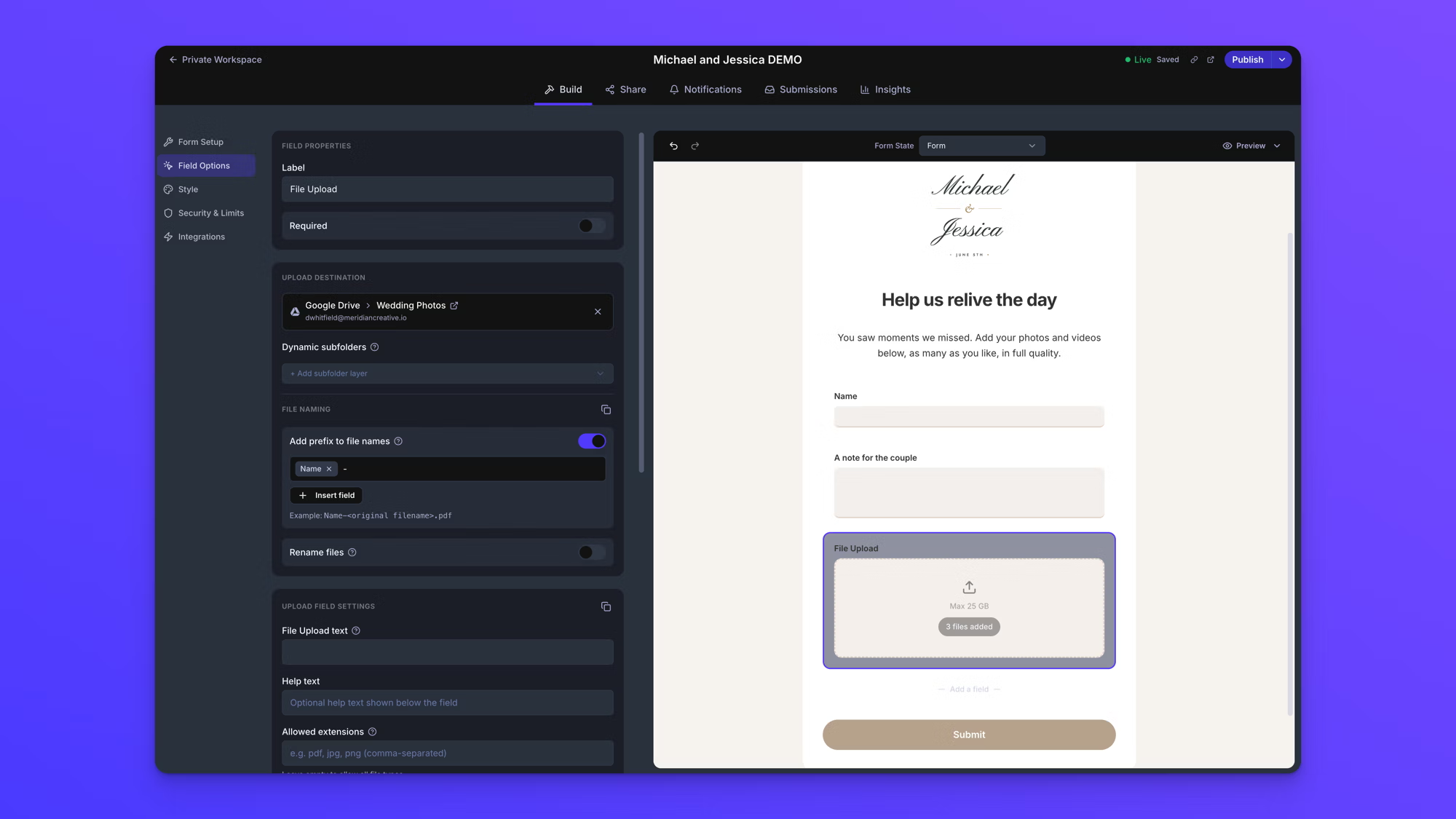
Open the File Upload field's settings and set its Upload Destination to the wedding folder. On the Business plan, you can also turn on Add prefix to file names and insert the Name field, so every file arrives with the guest's name in front of it. Or add a subfolder layer from the Name field, so each guest's photos arrive in a folder of their own. On any plan, the submissions inbox shows which guest sent which files. See dynamic file organization.
4. Write what guests will see
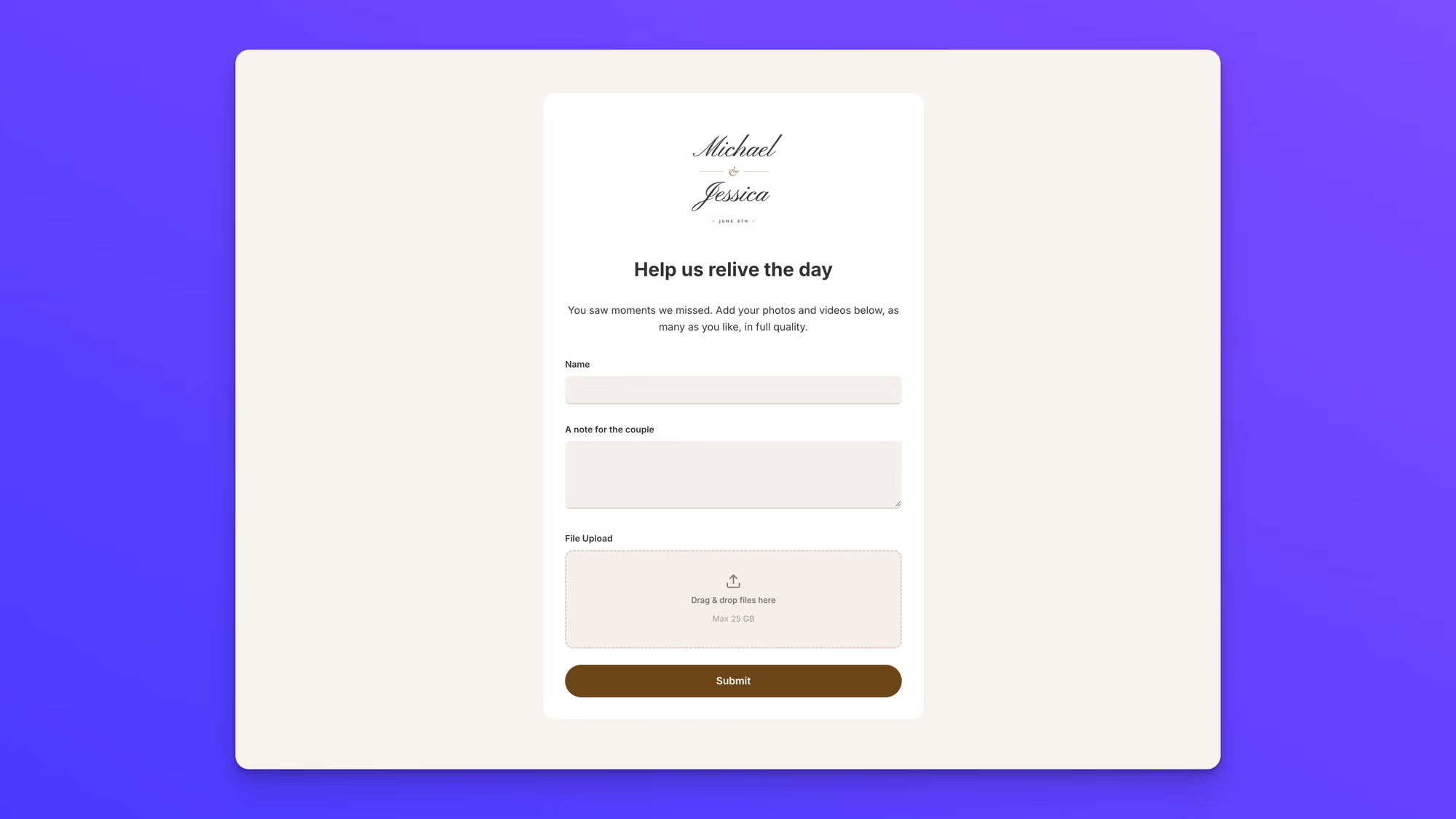
Give the form a warm header and a line or two of instruction. On our form, the header reads "Help us relive the day," and the text below it reads "You saw moments we missed. Add your photos and videos below, as many as you like, in full quality."
Then style it to match the wedding. On every plan, Quick Settings in the Style panel sets the form's mode, style, color, and font. Adding your own logo or monogram, like the one on the form at the top of this article, is on the Business and Premium plans. See style your form.
Then open Link preview settings on the Share tab and add an engagement photo as the Preview Image. When you text the link to the family group chat, it shows up as a photo card instead of a bare web address.
5. Publish and download the QR code
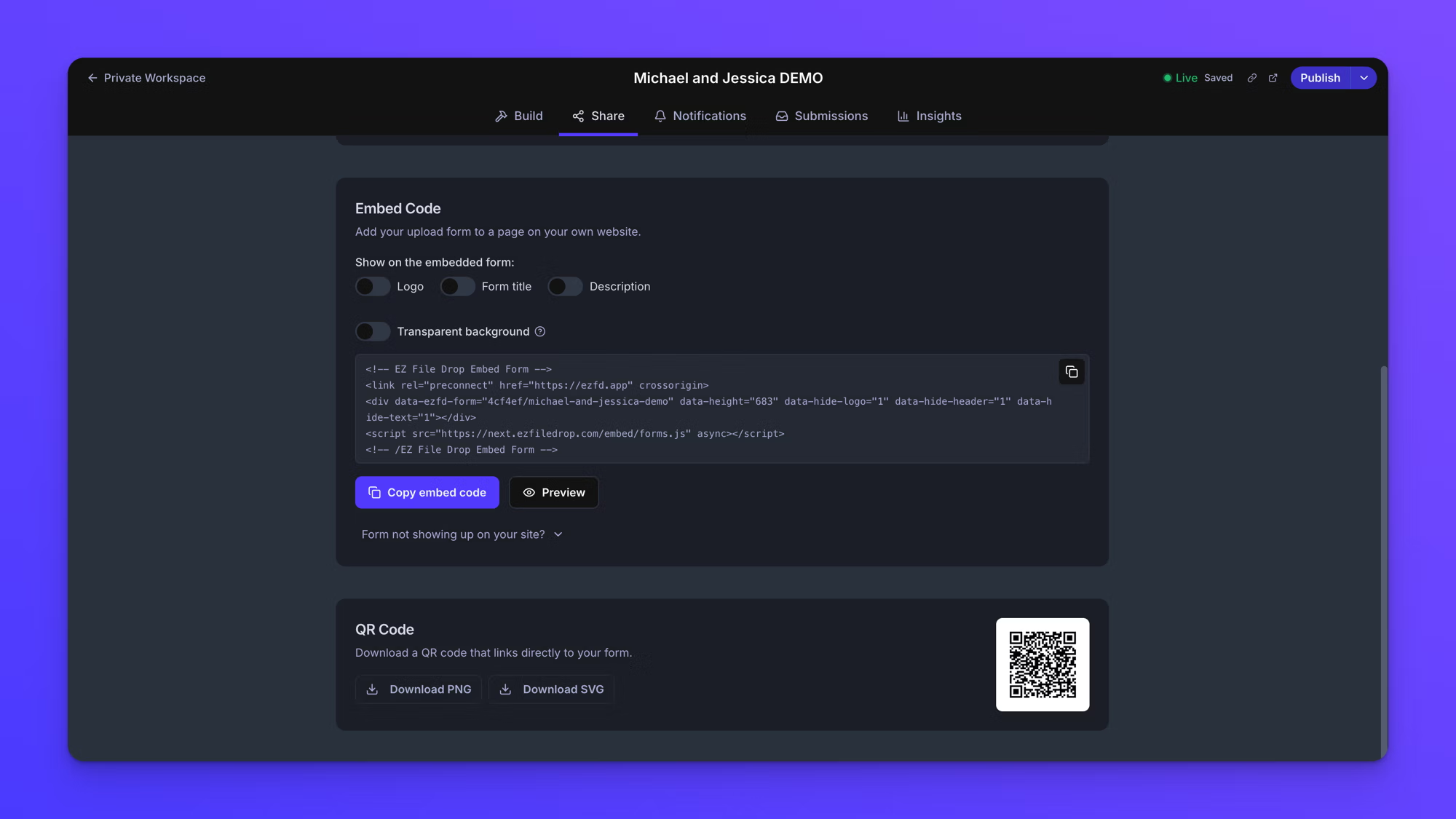
Click Publish, open the Share tab, and click Download SVG for anything printed, or Download PNG for slides and screens. The SVG stays sharp at any size, which matters on a welcome sign. If you change the form's URL later, download the code again. See share your form.
6. Test it from your phone
Before anything goes to the printer, scan the code with your own phone. Upload a photo and a short video, and confirm both arrive in the Drive folder. Then ask someone on the other kind of phone, iPhone or Android, to do the same.
7. Set the form to open and close on its own
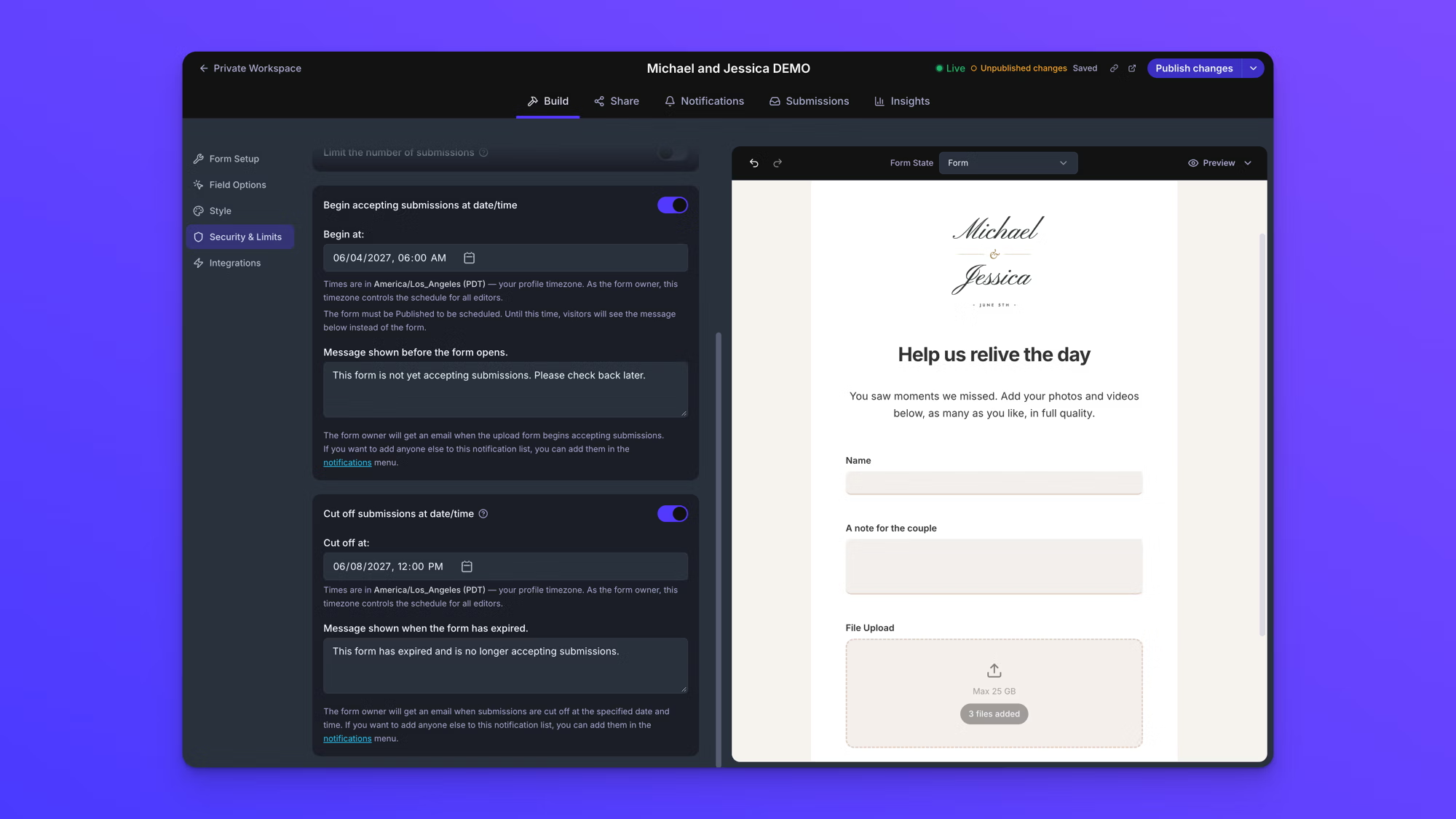
Since the form has no Email field, keep it open only as long as you need it. We suggest opening it the day before the wedding and closing it a couple of days after. That covers guests who upload on the night and the ones who send photos the next morning.
Do this after you test, because the form won't take uploads until its start time. On the Build tab, open Security & Limits, turn on Begin accepting submissions at date/time and Cut off submissions at date/time, and set both dates. You can also change the message guests see before the form opens and after it closes, such as "Come back on the wedding day to share your photos." Then click Publish changes. Scheduling is on the Business and Premium plans. On Starter, publish the form the day before the wedding and unpublish it a couple of days after. See schedule a form.
Our Starter plan covers most weddings: one user, a QR code, and 5 GB of uploads a month. If you'd like the form to open and close on its own, expect a lot of video, or want each guest's photos in their own folder, Business covers all three. The free trial is for building and testing. It has a 1 GB upload limit and shows a small trial banner on the form. Choose a plan before the QR codes go to print.
Where to put the QR code for wedding photos
The QR code does most of the work, and nearly every guest will open the form on a phone. Put the code where phones are already out:
- Table cards or centerpieces. Guests are seated and scrolling between courses.
- The welcome sign and the bar. Two places nearly every guest stands still.
- The program. People hold it through the whole ceremony.
- The photo booth backdrop. Guests are already taking pictures there.
Keep the sign to one line and one instruction: "Scan to share your photos and videos with us. No app needed."
The form's Insights tab counts QR scans separately from link visits, so you can see which signs got used. See form insights.
What to expect when guests start uploading
Every photo and video guests send is delivered to your Google Drive, so it all counts against your Google storage. A free Google account includes 15 GB, shared across Drive, Gmail, and Google Photos. If you're close to the limit, check your free space or add storage before the wedding.
Video is what fills it. A phone photo is a few megabytes, but a minute of phone video often runs past 100 MB, so a handful of clips can outweigh hundreds of photos.
Once the form is open, EZ File Drop emails you each time someone uploads, which is on by default and a nice way to relive the day from the honeymoon. It also emails you if a delivery to your Drive ever fails, so you can ask that guest to try again.
After the wedding: share the album and wrap up
To give guests a gallery after all, share the Drive folder with Viewer access and send the link. Everyone can browse and download every photo, and nobody can delete anything.
If you scheduled the form, it closes on its own. On Starter, unpublish it when you're done collecting. Anyone who opens the link after that sees a short message that the form isn't accepting submissions. See form statuses.
If the wedding was the only thing you needed EZ File Drop for, cancel your subscription. The photos are already in your Google Drive, so they stay right where they are.
When a wedding photo app is the better choice
An upload form isn't the right fit for every couple. Choose a wedding photo app if:
- You want guests watching photos appear on a screen at the reception.
- You want guests browsing each other's photos during the party, not after.
- You want a guestbook, voice messages, or a photo game in the same package.
- You'd rather not use your own Google storage at all.
If what matters most is every original file in your own Google Drive, with nothing to export or renew, an upload form is the simpler path.
Frequently asked questions
Can wedding guests upload photos to Google Drive without a Google account?
Not through Google Drive itself. A shared folder asks guests to sign in, and anyone with edit access can delete files. An upload form like EZ File Drop lets guests upload from any phone browser with no account, and every file is delivered to your Drive folder.
Can guests see each other's photos?
Not on the upload form. Each guest only sees their own upload. To share everything afterward, share the Google Drive folder with Viewer access and send guests the link.
Do guest photos lose quality when they're uploaded?
No. EZ File Drop delivers the files guests choose at full resolution, including video, with no compression. You get the same originals that are on their phones.
Can wedding guests upload videos?
Yes. Guests can add videos alongside photos in the same upload. Videos are far larger than photos, so a wedding where guests send a lot of video is a better fit for the Business plan.
How long should I keep the upload link open?
Open it the day before the wedding and close it a couple of days after. That covers guests who upload on the night and the ones who send photos the next morning, without leaving the link open longer than it needs to be.
Is there a free way to collect wedding photos from guests?
A shared album in Google Photos or iCloud is free. The photos stay inside the album rather than in a folder of files you control. In Google Photos, a guest's photos leave the album if they leave it. In iCloud, albums created before iOS 27 shrink photos to 2048 pixels and videos to 720p, so you don't get full-quality originals. Several wedding apps also offer free tiers with limits on photos or how long the gallery lasts.
The short version
To have wedding guests upload photos to your Google Drive, put an upload form in front of a Drive folder and print its QR code everywhere phones come out. Guests skip the app and the sign-in, and you keep every original file. If a live reception slideshow matters more than owning the files, a wedding photo app is the better fit.
Go back to the setup steps when you're ready, or try EZ File Drop for free with no credit card required. If you'd like the background on Drive uploads in general, see how to let anyone upload to your Google Drive without signing in.
Written by Eric Stracke