
Collect every speaker deck, named and organized for the run of show.
Speakers upload through one branded form. Their decks are delivered to your cloud storage, renamed and sorted by day and room.
No credit card required · 7-day Business plan trial




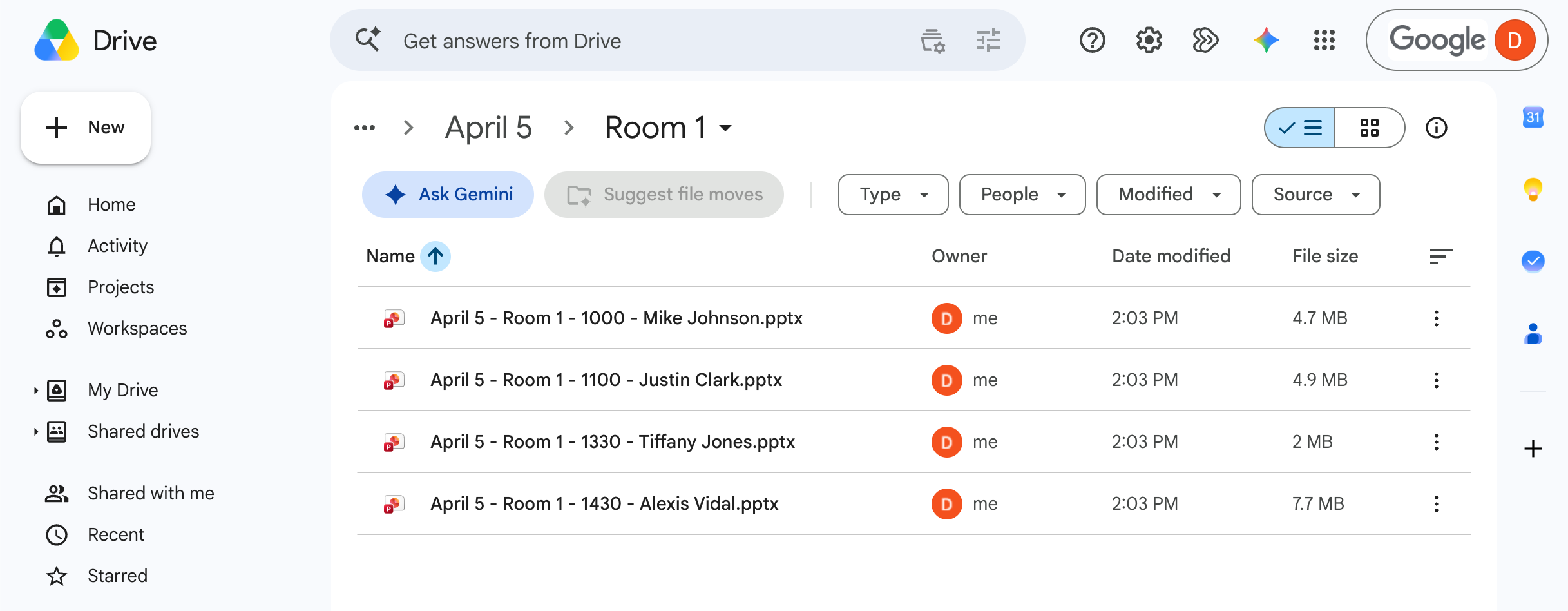
The night before shouldn't be a file hunt.
Most crews already have a shared folder for decks. Getting them there is often the hard part.
The files still come in named however the speaker felt like it: final.pptx, Keynote v3 (2).key, use-this-one.pdf. Some aren't files at all, just a Canva or Google Slides link you have to download, check for fonts, and test on the show machine. Someone on your crew matches each file to a session by hand, renames it, and drags it into a room folder. Then a speaker sends a new version at 11 pm, and now there are two.
Run that across a three-day conference with eight breakout rooms, and the entire process becomes an all too familiar frustration.
And when the wrong version opens on screen, nobody in the room blames the speaker.
Collect speaker presentations in three steps.
One branded form per event. Speakers don't need an account, app, or sign-in.
Build the form
Add dropdowns for things like day, room, and session time, then turn on file renaming and dynamic file organization. Every file can be renamed using the speaker's answers, so final_FINAL.pptx arrives as Day1_Theatre2_1330_Priya Patel.pptx, and filed into a folder for its day and a subfolder for its room.


Your client forwards one link to every speaker
Speakers pick their day, room, and session, add their deck and any playback videos.
Every deck is delivered to the right room folder
Submissions are delivered into a folder for each day and a subfolder for each room in your Google Drive, Dropbox, OneDrive, SharePoint, Box, or FTP/SFTP server. Your team gets an email for each one.
The features AV crews actually use.

FAQ
Do speakers need an account to upload?

No. They open the link, pick their session, add their files, and submit. There's nothing to install or sign into.
Can speakers send a Canva or Google Slides link instead of a file?
Not if you restrict the file types that your form allows. On Business and Premium, you can set the file upload field to accept only PowerPoint, Keynote, or PDF and make it required, so speakers have to download their deck from Canva or Google Slides and upload the file. We recommend making this clear in the form's instructions so nobody is surprised.
How large a file can a speaker send?
Up to 25 GB per submission on Business and Premium, and 5 GB on Starter. That's the total for everything a speaker sends at once, so a deck and three videos count together. Speakers see the limit on the form before they start. Files are stored in your own cloud storage, so check there's room before a big show, or set a lower limit on the upload field. If you need to receive submissions larger than 25 GB, email our support team and we can increase your team's limit at no charge.
Can files be renamed, or just given a prefix?
Both, on Business and Premium. Build the whole name from the answers to the fields you add to the form, like day, room, time, and name, or put those answers in front of the speaker's original file name. Use dropdowns for these fields so every name matches. See Rename incoming files.
Can submissions be sorted into folders automatically?
Yes, on Business and Premium. Folders are built from the fields you add to the form: choose Day, then Room, and each deck is delivered into a folder for its day and a subfolder for its room. See Set up dynamic file organization.
What happens when a speaker sends a revised deck?
They submit again through the same link, and nothing is overwritten. With full renaming, the new file gets the same name plus -2, then -3 for the next one, so the highest number is always the latest. With a prefix, a deck the speaker renamed keeps its new name, and an identical name gets -2 the same way. See Rename incoming files.
Can the event organizer get a copy of each submission?
Yes. You can add your client as a notification recipient, and they'll get an email every time a new submission is received. On Business and Premium you can customize email notifications and choose whether to include the speaker's form answers and links to the files. They don't need an EZ File Drop account. See Set up email notifications.
Can the form use our client's branding and domain?
Yes. Style the form in your client's colors and, on Business and Premium, swap our logo for theirs. On Premium, you can also put the form on their own domain, like speakers.clientevent.com, which means adding a few DNS records to that domain. See Set up a custom domain.
What if a speaker picks the wrong session?
Their deck is named and filed by the day, room, and time they picked. The notification email shows their answers, so a wrong pick is easy to spot, and you can move and rename the file in your cloud storage or have the speaker submit again. To head it off, use the same room names that are on the event program and signage.
Can our whole crew use one account?
Yes, on Business and Premium, you can add up to 20 users. You can choose whether forms are private or shared with your team and set sharing permissions form by form. Remember, the files are delivered to the cloud storage account picked as the form's upload destination, so your techs who need to access the files don't even need to have an EZ File Drop account just to access the files. See Manage users and Set form permissions.
Can we track submissions in a spreadsheet?
Yes, on Business and Premium. Each submission can be added to a Google Sheet as a new row, with the speaker's answers and a link to each file. Share the sheet with your client, and you can both check it against the run of show. See Send form data to a Google Sheet.
Is it secure enough for unreleased keynote content?
Yes. Uploads are encrypted in transit, and you connect your cloud storage through your provider's own sign-in, so we never see your password. Files sit in encrypted temporary storage only while they're being delivered, and that copy is deleted about an hour after delivery. See the security page.
Which plan do I need?
Business or Premium. Renaming, day and room folders, file type limits, Google Sheets, and team access are on both. Business includes 100 GB of uploads a month, and Premium includes 1 TB for shows with a lot of video. If you go over, your forms keep working and extra bandwidth is $15 per 50 GB. New accounts start with a 7-day Business trial. See How bandwidth works and the pricing page.
Have every deck in place before the first session
Build one speaker form, connect your cloud storage, and send the link with your call for presentations. Your crew stops renaming files during show week, and your client sees every deck sorted and ready before doors open.