.svg)
How to Build an Accounting Client Intake Form (with Free Template)
The accounting client intake form is the first formal document a new client sees from your firm. If it's clean, structured, and asks for the right information, the engagement starts on the right foot. If it looks like a hand-me-down with mismatched fonts and questions left over from a decade ago, the client notices.
This article zooms in on Step 3 of the 12-step bookkeeping client onboarding checklist: the intake form itself. The 25 fields below are what we recommend an accounting firm collect from every new client, the reasoning behind each section, and a downloadable template you can adapt to your firm.
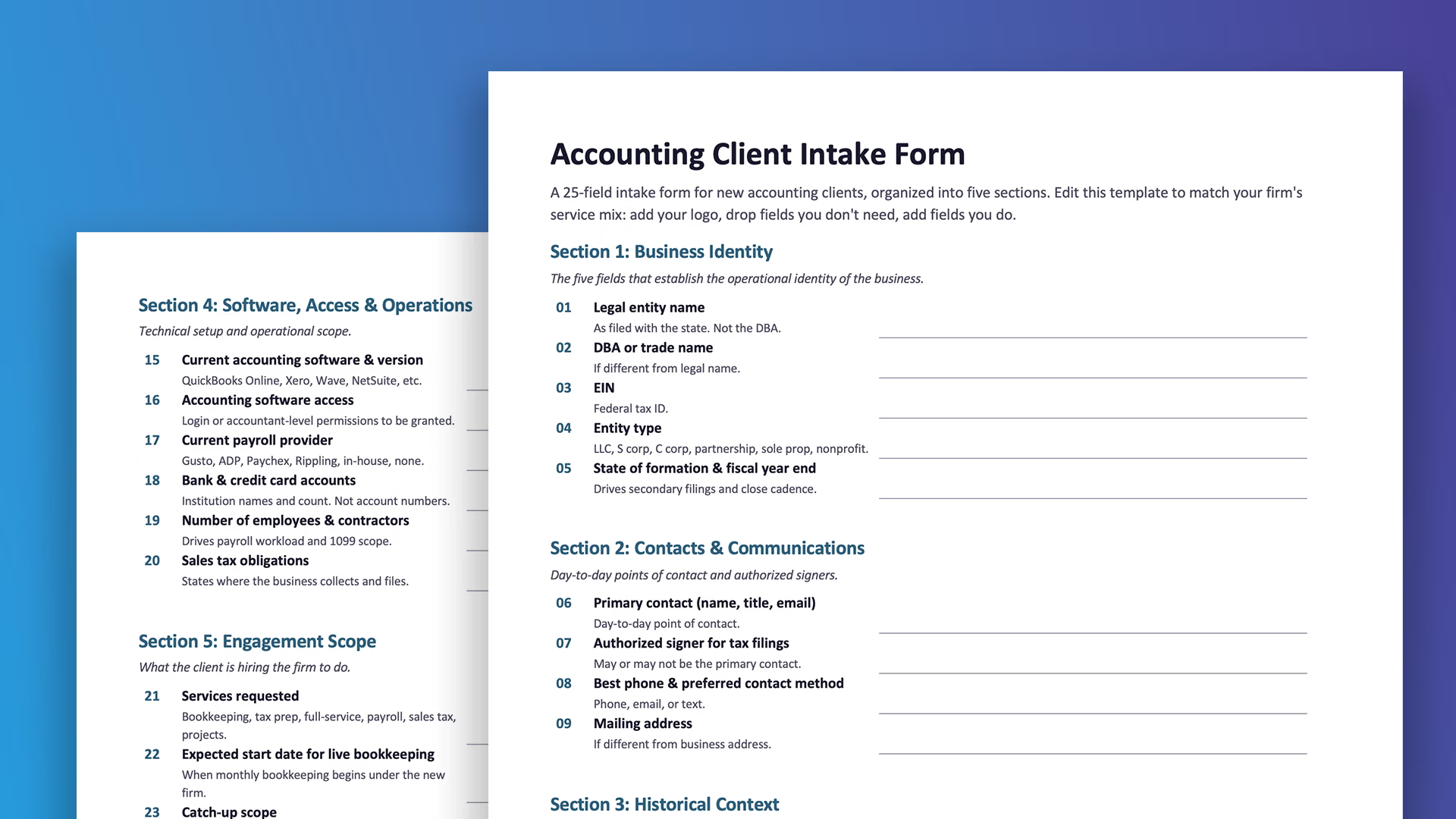
Get the free editable template. Download the Accounting Client Intake Form (Word doc). All 25 fields organized into the five standard sections in a fully editable Word document. Add your firm's logo, drop fields you don't need, add fields you do. No email required.
What Is an Accounting Client Intake Form?
An accounting client intake form is the structured document a CPA firm or bookkeeper sends to a new client to capture the foundational information needed to set up the engagement. It collects entity details, tax identifiers, prior preparer information, software access, and any open IRS or state tax issues. Done right, it eliminates the back-and-forth that typically delays the first 30 days of a new engagement.
It's distinct from a tax client intake form (which captures personal taxpayer information for return preparation) and from a generic client intake form (which captures cross-industry essentials like contact info, project goals, and budget). The accounting client intake form is purpose-built for ongoing engagements where the firm needs both the operational details to do the work and the historical context to do it correctly.
Why Generic Intake Forms Fail Accounting Firms
Most firms start with a generic client intake template, then bolt on accounting questions over time. The result asks for "company name" and "primary contact" but misses what actually matters: entity type drives the entire tax filing approach, fiscal year end determines the close cadence, and prior preparer contact is often the only way to recover a missing balance sheet from two years ago. Skip those on intake and you'll be chasing them down later, with the client wondering why the new firm is asking questions the old firm somehow knew the answer to.
The 25-Field Accounting Client Intake Form
A good accounting intake covers five things: entity-level identity (legal name, EIN, entity type), historical context (prior accountant, last close, open notices), software and access expectations (current platform, payroll provider, permissions), scope expectations (services requested, deadlines), and the right length (20 to 30 fields organized into clear sections, so it gets completed instead of abandoned). The 25-field structure below is calibrated to that framework. Each field is here for a reason, and the reasoning is included so you can adapt the form to your firm's service mix.
Section 1: Business Identity (5 fields)
- Legal entity name (as filed with the state). The name on the formation documents, not the DBA. Used on every tax filing.
- DBA or trade name, if different. What the business goes by day-to-day. Captured separately so it never gets confused with the legal name on a filing.
- EIN. Federal tax ID. Mandatory for any entity except sole proprietors filing under SSN.
- Entity type. LLC (single-member or multi-member), S corp, C corp, partnership, sole proprietor, nonprofit. Drives the filing approach.
- State of formation and fiscal year end. State determines secondary filing obligations. Fiscal year end determines the close cadence.
Section 2: Contacts and Communications (4 fields)
- Primary contact name, title, and email. The day-to-day point of contact. Often the owner for small businesses, often the controller or office manager for mid-sized.
- Authorized signer for tax filings. Sometimes the same person, sometimes not. Worth asking explicitly.
- Best phone number and preferred contact method. Phone, email, or text. The client's preference.
- Mailing address (if different from business address). For physical correspondence, IRS notices, and 1099 issuance.
Section 3: Historical Context (5 fields)
- Prior accountant or bookkeeper (firm name, contact, dates of service). The single most useful field on the entire form. The firm you're replacing usually has the historical records you need.
- Prior tax preparer (if different from the bookkeeper). Often a separate person or firm. Required for transition of tax records.
- Date of most recent monthly close. Tells you exactly how much catch-up work the engagement involves.
- Date and form of most recent tax return filed (federal and state). Tells you what's outstanding and the most recent baseline.
- Any open IRS or state tax notices. Critical to surface on day one. A notice the firm doesn't know about can become a missed deadline within weeks.
Section 4: Software, Access, and Operations (6 fields)
- Current accounting software and version (QuickBooks Online, Xero, Wave, NetSuite, etc.). Drives the technical setup and determines whether the engagement involves a software migration.
- Login or accountant-level access for the accounting software. The client either grants access during intake or commits to granting it within a defined window.
- Current payroll provider (if applicable). Gusto, ADP, Paychex, Rippling, or in-house. Each integrates differently with the major accounting platforms.
- Bank and credit card accounts (institution names, not numbers). The list of accounts that need to be reconciled. Account numbers are collected later through a secure document upload, not on the intake form.
- Number of employees and contractors. Drives the payroll workload and 1099 filing scope.
- Sales tax obligations (states where the business collects). Determines monthly or quarterly sales tax filing scope and which state portals need access.
Section 5: Engagement Scope (5 fields)
- Services requested. Bookkeeping, tax preparation, full-service, payroll, sales tax, or specific projects. Free-text plus a checklist works well.
- Expected start date for live bookkeeping. When the client expects monthly bookkeeping to begin under the new firm.
- Catch-up scope (if applicable). How far back the client wants the books brought current. Often a separate fee from the ongoing engagement.
- Specific deadlines the client is working against. Pending tax returns, audit response dates, financing applications, sale of business.
- Anything else the firm should know. A free-text field. Catches what doesn't fit anywhere else.
Engagement Letter Integration
The intake form and the engagement letter work together. The intake captures what the client says they need. The engagement letter codifies what the firm agrees to deliver. The fields in Section 5 are the inputs to the scope language.
Two practical patterns. Send the engagement letter within 24 hours of receiving the completed intake, and reference specific fields from the intake in the scope section so the document feels personalized rather than templated. And treat any field the client left blank as a flag, not a default. Empty fields are usually questions the client didn't know how to answer.
Where this fits in the broader onboarding: discovery call, intake form sent within 24 hours, intake reviewed before the engagement letter is drafted, engagement letter referencing specific intake responses, document collection alongside the signed letter, 30-day check-in. The intake form is Step 3 in the full bookkeeping client onboarding checklist.
Collecting the Intake and the Documents in One Form
The cleanest setup we've seen for accounting firms isn't two separate tools. It's one EZ File Drop upload form that does both jobs at once: collects the 25 intake fields above as custom form fields and receives the supporting documents (prior tax returns, bank statements, W-2s, 1099s) in the same submission. The client clicks one link, fills in the fields, drops in the files, hits submit. The firm gets the form data and every supporting document organized into a folder named after the new client, sitting in the firm's existing Google Drive, Dropbox, OneDrive, or Box.
The advantage over the typical setup is mostly about friction. Most accounting firms run intake and document collection as two separate steps: a Google Form or CRM intake link for the structured questions, and email or a separate file request tool for the supporting documents. Clients who get two links often finish the easier one first and procrastinate on the second; clients who get one well-designed link tend to finish in one sitting. The firm also receives a single notification with both the intake responses and the file list, instead of stitching together responses from two systems to figure out what arrived and what's still missing. And the cost is one Business plan subscription ($29/month) rather than a dedicated intake tool plus a separate document collection tool, with the firm's data living in cloud storage the firm already pays for.
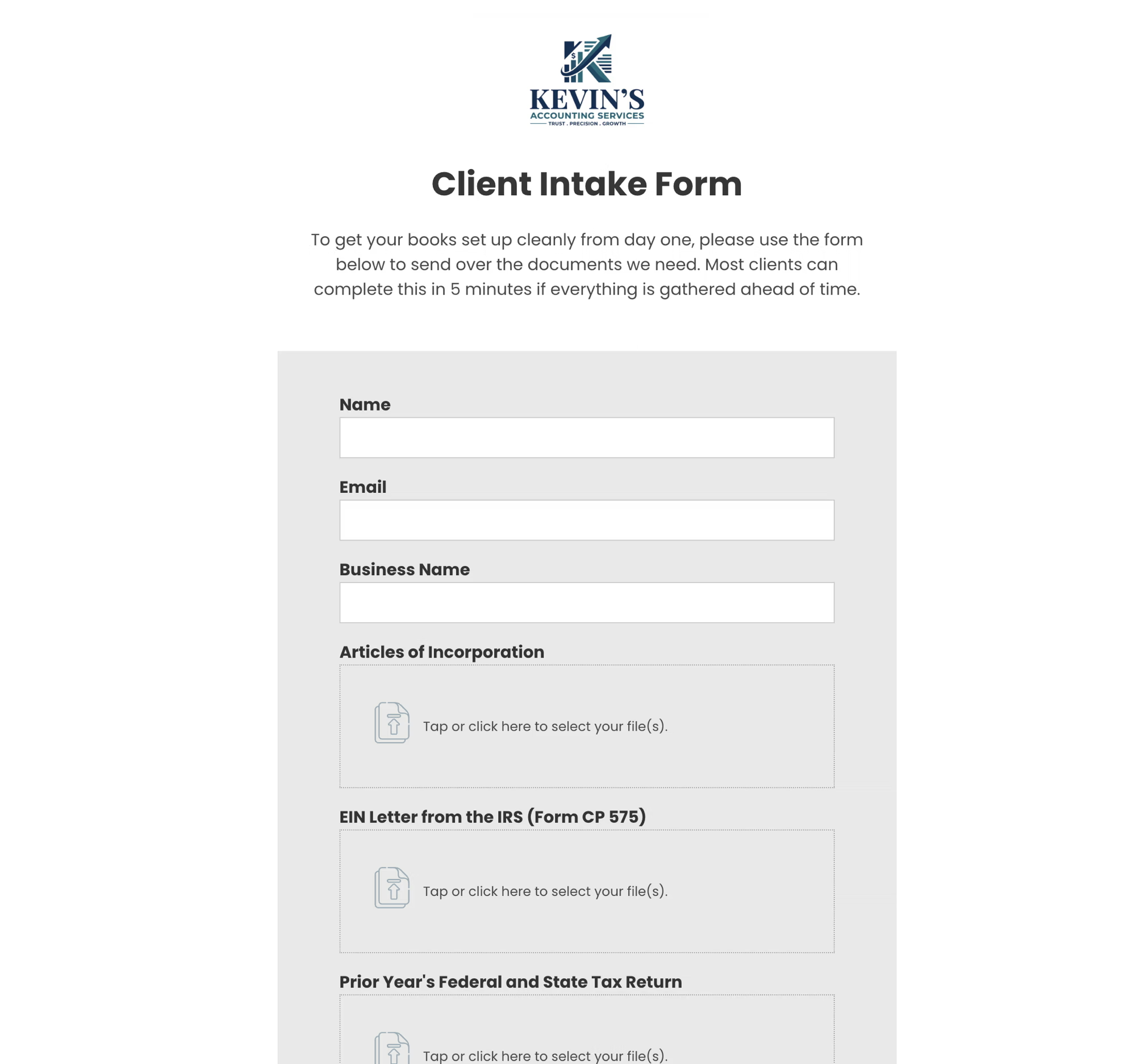
The form builder supports every field type the intake needs: short text (legal name, EIN), dropdowns (entity type, accounting software, payroll provider), email and phone, multi-select checkboxes (services requested), and free-text fields. Hidden fields capture firm-side metadata the client never sees, like which advisor owns the client. Dynamic file organization uses the client's business name to automatically name the folder where their documents land.
Setup takes about 20 minutes. The 25 fields are direct inputs into the form builder. Each dropzone has its own file size and type controls the firm sets. For example, capping bank statement uploads around 50MB and limiting accepted types to PDF, JPG, and PNG keeps submissions clean and prevents random files from showing up. Brand the form with the firm's logo, colors, and a custom welcome message, then embed it on the firm's website or send it as a standalone link. The 7-day Business trial requires no credit card. The Google Drive integration page covers the cloud storage connection, and the dynamic file organization tutorial walks through the subfolder automation.
The Simplest Possible Setup
Most firms start here. The simplest version of this form skips the labeled dropzones entirely: one form with the 25 intake fields and a single catch-all dropzone where the client uploads everything together. The firm sorts the files on their end inside the cloud storage folder, which takes a few minutes per onboarding but saves the upfront form setup time.
Build the simple version in 5 minutes, run a few clients through it, and add separate labeled dropzones later only if the firm decides the upfront sorting is worth more than the back-end sorting. For practices with low onboarding volume (one or two new clients a month), the simple version is often the right permanent answer.
Routing the Form Data into a CRM
Firms that already run a CRM (Karbon, Canopy, TaxDome, HubSpot, Pipedrive) often want the intake responses to land in that system rather than only in EZ File Drop's submission manager. The cleanest way to do this is the Zapier integration: the form lives at EZ File Drop, the client uploads through the unified form, and Zapier routes the structured form data into the CRM as a new contact, deal, or project record. The client still sees one link and one form; the firm gets the data in the system it already runs.
For firms whose CRM is effectively a Google Sheet, the Google Sheets integration writes form responses directly into a sheet without needing Zapier as an intermediary. Available on forms that route uploads to Google Drive.
When neither route fits (usually a CRM that doesn't have a Zapier connector, or a system that needs intake data routed in a non-standard format), the two-link pattern is the right fallback: send the intake through the CRM, use EZ File Drop only for documents. Less common, but valid.
Security and the Firm's Existing Cloud Storage
Files travel over TLS in transit, are temporarily staged in encrypted Amazon S3 storage, and get delivered directly into the firm's own cloud storage. Forms also support password protection, CAPTCHA, and two-factor authentication on the team account.
The cloud-storage delivery is more important than it sounds. Many accounting firms use Box or Microsoft OneDrive specifically because those platforms carry the compliance certifications and audit controls regulated work requires. EZ File Drop plugs into the firm's existing storage rather than holding files itself, so the firm's compliance posture is whatever the underlying cloud storage already provides.
When EZ File Drop Isn't the Right Fit
A few honest boundary cases. The product is a one-way intake and upload form, not a client portal. If the firm needs ongoing two-way file sharing where the client both uploads documents and downloads completed returns, a portal product is a better fit. The form is also single-page with no conditional logic, so if the intake needs to branch ("if entity type = S corp, show fields X and Y"), a dedicated form builder like Jotform handles that better.
Ongoing Use
The intake form isn't a one-time document. Revisit the fields whenever a client's entity changes, services expand, the primary contact changes, the client switches accounting or payroll software, or a year has passed. A short "intake refresh" form (5 to 10 fields covering what's likely to change) keeps the firm's records current without re-asking everything, and becomes a small annual touchpoint signaling the firm is paying attention.
FAQ
What should an accounting client intake form include?
At minimum: legal entity name and EIN, entity type and fiscal year end, primary contact, prior accountant and tax preparer, current accounting software and access, payroll provider, bank and credit card accounts (institution names, not numbers), open IRS or state notices, services requested, and expected start date. Full 25-field structure above.
How is an accounting client intake form different from a tax client intake form?
An accounting client intake form is for ongoing accounting engagements like bookkeeping, monthly close, tax preparation, and advisory. It captures entity-level information about a business. A tax client intake form is for personal tax return preparation and captures individual taxpayer information. The two forms have minimal overlap.
Should the intake form ask for bank account numbers?
No. The intake should ask for institution names and account count, not account numbers. Actual account numbers, statements, and other sensitive financial documents should be collected through a secure document upload (or, in a unified setup, the file dropzones on the same form), not entered into a form text field.
How long should an accounting client intake form be?
Aim for 20 to 30 fields organized into clear sections. Shorter forms miss critical information. Longer forms get abandoned. Sectioning matters as much as length: 25 fields in five sections of five reads much faster than 25 fields in one long list.
Can the same intake form be used for bookkeeping, tax, and advisory clients?
Yes, with one section that adapts. Sections 1 through 4 (entity identity, contacts, historical context, software and operations) apply to every accounting engagement. Section 5 (engagement scope) is where the form differentiates with a checklist of services requested that handles the variation across bookkeeping, tax, and full-service engagements.
Should the intake form be sent before or after the engagement letter?
Before. The intake form's responses are the inputs to the engagement letter's scope language. Sending the engagement letter first risks committing to scope that doesn't match what the client actually needs. The cleaner sequence is discovery call, intake form, engagement letter informed by the intake responses, signed engagement letter and document collection.
Wrap Up
A well-designed accounting client intake form pays back across the entire engagement. The 25 fields above are a starting point. Adapt them to the firm's service mix, and put the form into production as a single EZ File Drop upload that collects the intake fields and the supporting documents in one client-facing submission. Try EZ File Drop free for 7 days, no credit card required. Or grab the free editable template and customize it for your firm.
Written by Matt Townley
Try EZ File Drop Today!
Start Free TrialIntegrations
EZ File Drop + Google DriveEZ File Drop + DropboxEZ File Drop + OneDriveEZ File Drop + BoxStay in Touch


