
How to Create a Client Intake Form for Law Firms
A client intake form is the questionnaire a business asks new clients to complete before work begins. A law firm client intake form is a specialized version of it. It collects the same foundational information as any service business (contact details, nature of the matter, timeline), but it also has to accomplish things no other intake form does: screen for conflicts of interest, protect prospective-client information, and avoid accidentally creating a duty of representation before the firm has agreed to take the case.
Get that wrong and the form isn't just inefficient. It can create ethical exposure.
This guide covers what belongs on a legal intake form, what should wait for the consultation, how to structure the form for different practice areas, and how document collection (police reports, medical records, court filings) fits into the workflow. It includes sample disclaimer language you can adapt with your own counsel's review. Nothing here is legal advice; your state bar's rules control.
What Makes Legal Intake Different
Three things set a law firm intake form apart from a generic service-business intake:
Conflict checking. Every potential client interaction creates the possibility of a conflict of interest under ABA Model Rules 1.7, 1.9, and 1.18. Before an attorney can review case details or offer advice, the firm has to screen the names of involved parties against current and former client records. A law firm intake form has to collect enough information to run that check before substantive case discussion begins.
Prospective client confidentiality. Under ABA Model Rule 1.18, information shared by a prospective client is protected even if the firm declines the matter. That changes how intake data is stored and who has access to it. Intake records need the same care as active client files.
No accidental attorney-client relationship. Intake forms should include clear language that submitting the form does not create an attorney-client relationship, and that the firm may decline to represent the prospective client. Without this, a firm can inadvertently create duties it didn't intend to take on.
These three constraints shape every decision about what goes on the form, how it's stored, and who reviews it.
What to Include on a Law Firm Client Intake Form
Legal intake forms follow a six-section structure. Each section has legal-specific requirements.
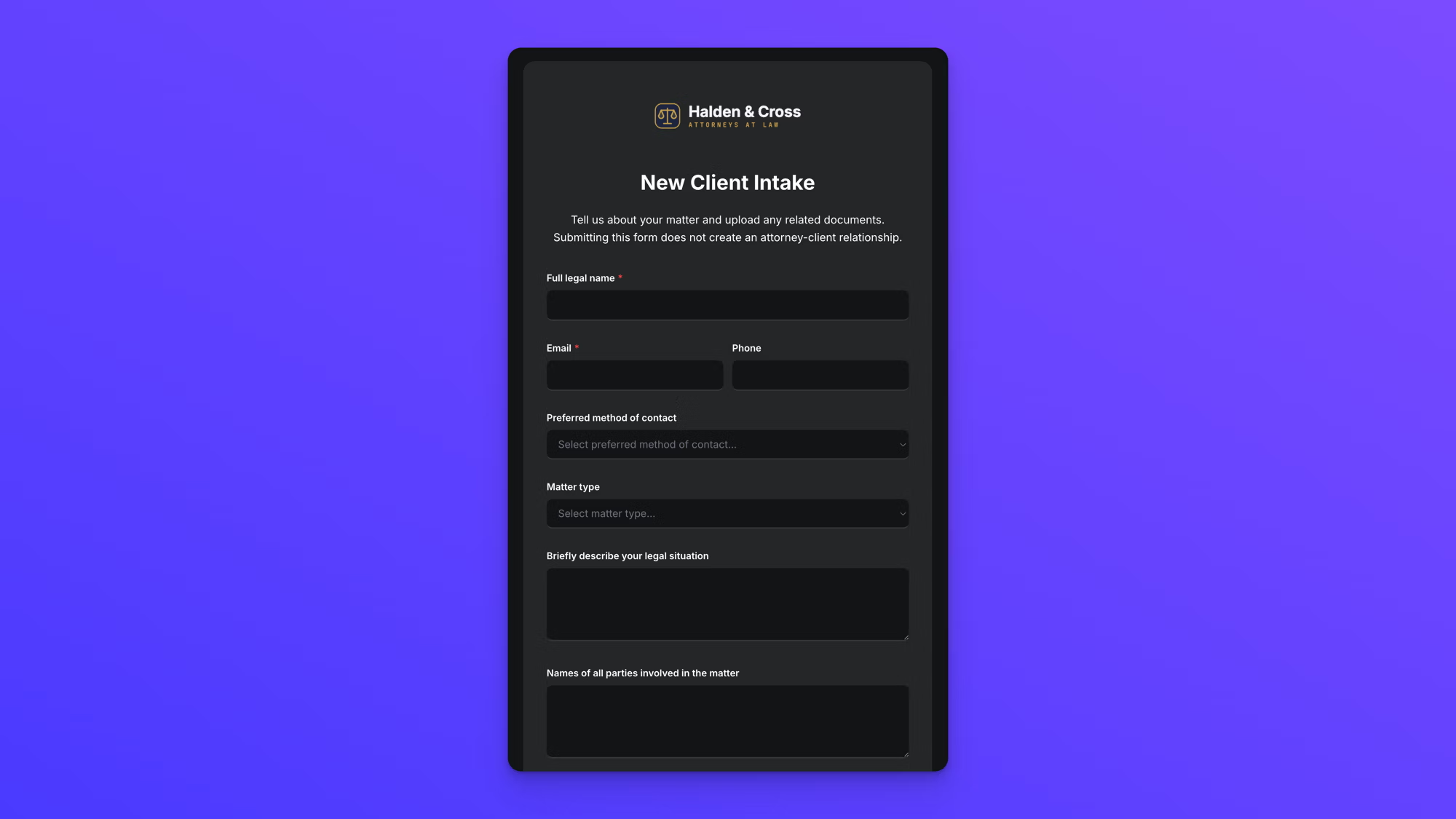
1. Contact Information
Standard: full legal name, address, phone, email, preferred method of contact, best time to reach.
Legal-specific additions:
- Date of birth. Required for identity verification and for court filings in many jurisdictions.
- Occupation and employer. Relevant for conflict checks (the employer may also be a firm client) and for fee evaluation.
- Referral source. Required by some state bar associations for marketing compliance tracking.
2. Matter Type and Description
Rather than a generic "project goals" field, legal intake needs a practice area selection and a case description. A dropdown covering the firm's practice areas (family law, personal injury, criminal defense, estate planning, business/corporate, real estate, immigration, etc.) routes the matter to the right attorney and drives conditional logic for practice-area-specific fields.
The case description field should be a short-answer prompt: "Briefly describe your legal situation." This gives the firm enough to run conflict checks and schedule the consultation, without requiring the client to narrate their whole case up front.
3. Conflict Check Information
This is the section with no equivalent in generic intake forms. At minimum:
- Names of all parties involved in the matter (adverse parties, co-defendants, business partners, family members where applicable)
- Names of any other law firms previously consulted on this matter
- Company or entity names relevant to the matter, including aliases, parent companies, or related entities for business matters
Add a brief note next to the field: "Used for conflict-of-interest screening only." This reassures clients who might otherwise hesitate to share adverse-party names.
For matters where the full list of involved parties isn't yet known, allow the client to indicate that and follow up during the consultation.
4. Timing and Urgency
Legal matters often have hard deadlines that drive the entire engagement. Ask:
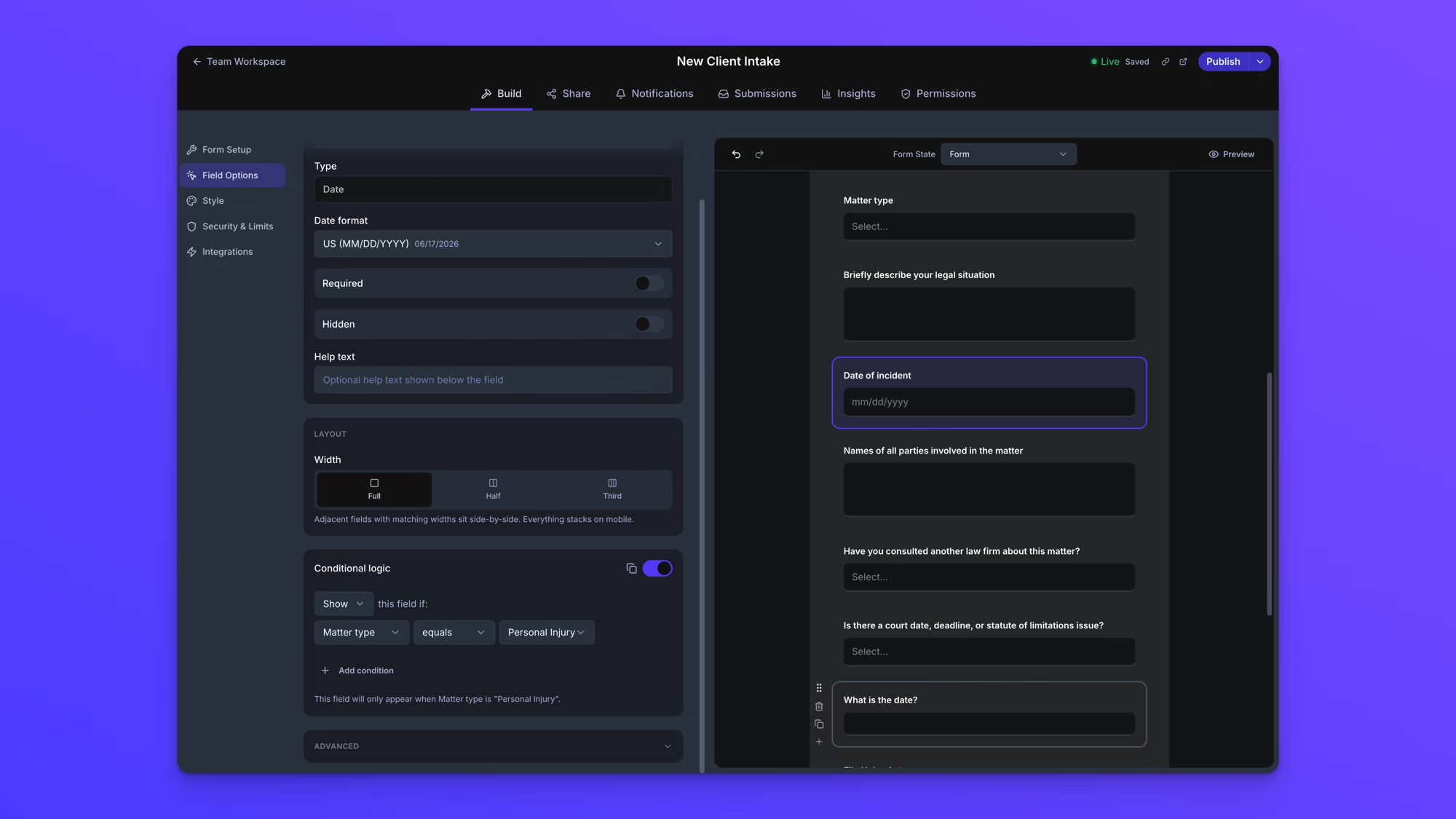
- Is there a court date, deadline, or statute of limitations issue? Set this up as a two-option Yes/No dropdown, then use conditional logic to reveal a follow-up field ("What is the date?") only when the answer is Yes.
- Has legal action already been filed against you or by you? Another Yes/No dropdown.
A pending court date changes the consultation priority and may require the firm to decide quickly whether to take the case.
5. Documents and Evidence
Almost every legal matter involves documents. Instead of asking clients to describe them in text, let them upload them directly through the intake form. Common uploads by practice area:
- Personal injury: Medical records, accident photos, police reports, insurance correspondence
- Family law: Existing court orders, prenuptial agreements, financial statements, custody documents
- Criminal defense: Police reports, arrest records, court filings, bail documentation
- Estate planning: Existing wills, trusts, deeds, asset inventories, beneficiary designations
- Business/corporate: Contracts, incorporation documents, correspondence, financial statements
- Immigration: Identification documents, visa paperwork, supporting affidavits
Collecting these at intake, rather than chasing them by email after the consultation, compresses the timeline significantly and lets the attorney arrive at the first meeting prepared.
6. Fee Structure Acknowledgment and Disclaimers
The intake form should close with language that sets clear expectations. Sample wording below is a starting point; have your own counsel adapt it to your jurisdiction.
- Attorney-client relationship disclaimer. Sample language: "Submitting this form does not create an attorney-client relationship. An attorney-client relationship is formed only upon execution of a written engagement agreement."
- Confidentiality notice. Sample language: "Information submitted through this form is treated as confidential and protected under applicable rules of professional conduct, even if the firm does not ultimately represent you."
- Consent to contact. Confirm the client authorizes the firm to contact them at the provided email or phone number to discuss the matter.
Some firms also include a fee acknowledgment here (e.g., "I understand that an initial consultation fee of $X may apply"), but many firms save detailed fee discussions for the consultation itself.
What to Leave Off the Intake Form
Just as important as what goes on the form is what stays off. Collecting sensitive data you don't need creates storage and handling obligations without adding value to the evaluation.
A few fields that commonly appear on poorly designed legal intake forms but shouldn't:
- Social Security number. Only collect when legally required for a specific filing, and collect it through a secure channel separate from the initial intake.
- Detailed financial disclosures. Full asset and income statements should wait for the consultation or a follow-up secure form, not the initial intake.
- Medical history beyond what's relevant to the matter. Unless the matter is medical malpractice or personal injury, avoid collecting extensive medical records at intake.
- Credit card or payment information. Payment collection belongs after engagement, not at intake.
- Criminal history beyond the current matter. Unless directly relevant to the case, avoid collecting prior criminal records on the intake form.
Customizing the Intake Form by Practice Area
A generic intake form works for initial inquiries across practice areas, but most firms benefit from practice-area-specific forms that use conditional logic. When a client selects "Personal Injury" as the matter type, the form reveals personal-injury-specific fields. When they select "Family Law," it reveals family law fields.
Common practice-area-specific additions:
- Personal injury: Date and location of incident, type of injury, medical treatment received, insurance information, police report status
- Family law: Marriage date, spouse's name, children's names and ages, existing custody arrangements, financial status
- Criminal defense: Arrest date, charges filed, court case number, next court date, bail status, arresting agency
- Estate planning: Current estate documents (Yes/No), beneficiaries, executor preferences, estimated estate value range
- Business/corporate: Entity type, state of incorporation, relevant contracts, regulatory concerns
- Bankruptcy: Debt types, creditor names, prior bankruptcy filings, household income
Firms that handle multiple practice areas should build out conditional logic rather than separate forms, so the intake experience stays unified while still capturing practice-area-specific detail. In practice this means each practice-area field carries a simple rule: show this field if Matter Type equals Personal Injury. Stack as many conditions as a field needs, and the client only ever sees the questions that apply to their situation.
How EZ File Drop Fits Legal Intake
Most legal matters involve document collection alongside structured intake data. That's the specific combination EZ File Drop is built for: a branded form that collects both form data and file uploads, with everything routing to your firm's existing cloud storage.
A few places EZ File Drop fits legal intake workflows:
- When the intake involves meaningful file uploads. Medical records, court filings, contracts, identification, reference documents. Clients can upload files up to 25 GB per submission on Business and Premium plans, and everything routes to Google Drive, Dropbox, OneDrive, Box, SharePoint, or an FTP destination your firm controls.
- When the firm wants the intake page branded. Forms carry your firm's logo, colors, and fonts on Business and Premium plans, fully white-labeled with no EZ File Drop branding on the upload page or in confirmation emails.
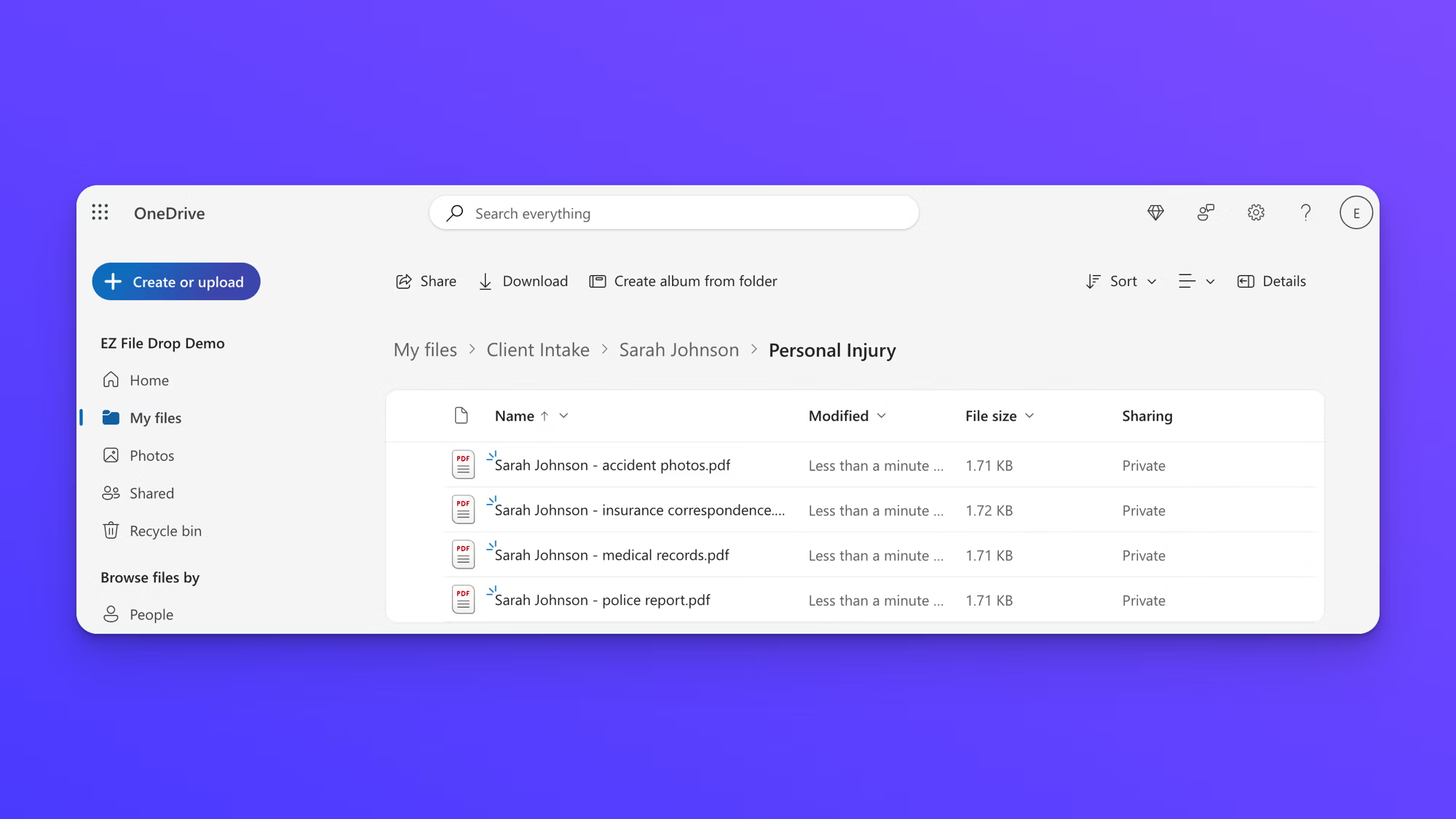
- When you want uploaded documents auto-organized by matter. Form field data (client name, matter type) can automatically create subfolders and add a prefix to file names, so a new personal injury intake from Sarah Johnson routes to a "Sarah Johnson" subfolder with files renamed "Sarah Johnson - police report.pdf," "Sarah Johnson - medical records.pdf," and so on. If a client's folder already exists, new uploads go into it; no duplicate folders are created.
- When sensitive documents are involved. Uploads are encrypted in transit, cloud storage connections use OAuth2, and files route directly into storage your firm controls. EZ File Drop doesn't keep your files; temporary copies are removed automatically after delivery. See the security overview for the full model.
EZ File Drop isn't legal practice management software. It doesn't run conflict checks against your existing client database (your practice management system does that) and it doesn't manage matters or billing. It's the intake-and-file-collection layer that sits in front of those systems. If your workflow already uses Clio, PracticePanther, MyCase, or a similar platform, EZ File Drop complements them by handling the client-facing intake page and delivering data into your existing infrastructure.
That handoff can be automated. EZ File Drop connects to Zapier on the Business and Premium plans, and Clio, MyCase, and PracticePanther each have Zapier integrations of their own, so a new intake submission can trigger a Zap that pushes the client's information into your practice management system automatically, with no retyping between tools. Firms with technical help on hand can use webhooks instead to send submission data to any endpoint they control.
Putting the Intake Form on Your Law Firm's Website
An online client intake form works best when it lives where prospective clients already are: your firm's website. EZ File Drop embeds into WordPress, Webflow, Squarespace, Wix, or any HTML-supporting page, so clients complete intake and upload documents without ever leaving your site. If you'd rather not touch the website, every form also has its own share link you can send by email or text, which is often the faster path for clients who called the office first.
Either way, the form carries your firm's branding, and submissions route to the same destination folders with the same organization rules.
For a broader look at how firms run document collection with EZ File Drop day to day, see how law firms use EZ File Drop.
Best Practices for Legal Intake Forms
A few rules that apply regardless of practice area:
Keep the initial form short. Aim for 10 to 15 questions. Clients filling out intake forms are often stressed and dealing with urgent legal situations. Long forms get abandoned. You can always gather more detail in the consultation.
Group fields into clear sections with headers (Contact Information, Matter Details, Conflict Check, Documents, Disclaimers). Scannable structure beats a wall of questions.
Use plain language, not legal jargon. "What brings you to our firm?" gets better answers than "Please describe the cause of action and any related causes of action."
Optimize for mobile. Many intake forms are completed from phones. Test the form on a mobile device before sharing.
Respond fast. Research on legal lead response consistently shows that responding within minutes of intake submission dramatically increases conversion. Automated confirmation emails followed by human follow-up within an hour is a reasonable target.
Delegate initial intake to nonlawyer staff when possible. ABA guidance recommends that initial intake screening be handled by nonlawyer staff to prevent attorney communication with prospective clients from creating imputed conflicts.
Store intake data with the same care as active client files. Under Model Rule 1.18, prospective client information is protected even if the firm declines the case. Intake records belong in storage your firm controls, with access limited to the people who need it.
Frequently Asked Questions
What should a law firm client intake form include?
A law firm client intake form should include six sections: contact information (including date of birth and referral source), matter type with a brief case description, conflict-check information (names of all involved parties and previously consulted firms), timing and urgency (court dates and deadlines), document uploads, and disclaimers covering the attorney-client relationship, confidentiality, and consent to contact.
Do clients need an account to submit the intake form?
No. With EZ File Drop, clients open your intake form from a link or directly on your website and submit their information and documents without creating an account or signing in to anything. Removing the login step is one of the biggest drivers of intake completion, especially for clients submitting from a phone.
How are intake documents organized by client and matter?
Form fields like client name and matter type can automatically create subfolders in your firm's cloud storage and add a prefix to file names, so every submission arrives sorted and labeled. If a client's folder already exists, new uploads go into that same folder; no duplicate folders are created.
How do law firms benefit from customizable intake forms?
Customizable intake forms let a firm collect exactly what each practice area needs without overwhelming every client with every question. Conditional logic shows personal-injury fields only to personal-injury clients and family-law fields only to family-law clients, which keeps the form short, raises completion rates, and delivers the attorney a complete picture before the first consultation.
Which plan do I need for the legal intake features?
Every plan, including Starter, connects all supported cloud destinations and includes the form builder, share links, and email notifications. The features most firms lean on, like branded forms with your logo and colors, conditional logic per matter type, file renaming, and embedding the form on your website, are part of the Business and Premium plans. All new accounts start on a 7-day Business trial.
Start Collecting Intake That Actually Helps
A well-designed legal intake form does three things at once: it gives the firm enough information to evaluate a case and run a conflict check, it gives the prospective client a professional first impression, and it stays inside the ethical boundaries every law firm has to work within.
If document collection is a meaningful part of your intake, try EZ File Drop for free. The 7-day free trial runs on the Business plan with no credit card required, enough to build a branded intake form for your firm and run real client submissions through it.
Written by Eric Stracke